
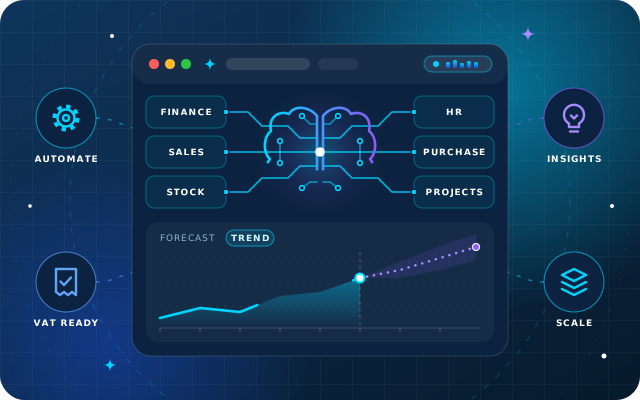
Most ERP vendors now describe their product as an AI-driven ERP. For a growing business in the UAE, the useful question is narrower: which daily decisions get faster or safer, and what has to be true about your data before that happens?
This guide answers that without the buzzwords. It covers what AI inside an ERP does in practice, five jobs worth paying for, the groundwork they depend on and the questions to put to any vendor, including us.
What "AI in ERP" means in practice, and what it does not
In practice, AI in an ERP is a set of models and rules that read your transaction history and write something back: a forecast, an alert, a suggested quantity or a draft posting. The value depends on where that output lands. A forecast buried in a separate analytics tool gets ignored, while a suggested reorder quantity on the purchase screen gets used.
It works because an ERP already holds the most complete record of how the business runs. Sales orders, receipts, bank lines, timesheets and approvals are structured, dated and linked to each other. That is exactly the material pattern-finding models need.
What it is not
- Not a chatbot bolted onto the accounting system. A chat window that cannot see live ledger data is a search box with a personality.
- Not autonomous. Good systems suggest and flag; people approve anything that matters.
- Not a fix for messy processes. A model trained on inconsistent data produces confident, inconsistent answers.
- Not a crystal ball. Models project patterns from history with a margin of uncertainty. They cannot foresee a new competitor, a supplier failure or a sudden change in regulation.
A quick test for any AI feature: ask where its output appears in the daily workflow and who acts on it. If the answer is "on a separate dashboard, for whoever looks", the feature is decoration.
Five jobs an AI-driven ERP should do for you
These are the jobs that change daily decisions in a growing business. Each one reads from the same ledger your team already works in, and each one hands its result to a person.
1. Demand and cash forecasting
Demand forecasting projects how much of each product you are likely to sell, using sales history, seasonality and supplier lead times. In the Gulf, where demand shifts around Ramadan, Eid, school terms and the summer months, seasonality matters more than a simple average can capture.
Cash forecasting applies the same thinking to money: expected receipts from open invoices and customer payment habits, set against committed bills, payroll and rent. A useful forecast shows a range rather than a single figure, so you can plan for the low case as well as the likely one.
2. Anomaly detection in transactions and stock
Anomaly detection learns what normal looks like and flags what does not. Typical examples are a discount far outside a salesperson's usual range, a vendor bill that duplicates one already paid, a stock adjustment outside normal patterns or a margin that suddenly drops on a product line.
The benefit is timing. An accountant reviewing a flagged bill this week is far cheaper than an auditor finding it after year-end.
3. Reorder and pricing suggestions
Reorder suggestions turn consumption, lead time and minimum stock levels into a proposed quantity and supplier for each item. Pricing suggestions watch cost changes against target margin and propose price-list adjustments before margin quietly erodes.
Both remain suggestions. The buyer or sales manager sees the inputs behind them and makes the call.
4. Automated postings and reconciliation
Much of month-end is repetitive matching: bank lines to invoices, recurring entries on a schedule and inter-company charges between related entities. Automation handles the predictable cases and leaves the exceptions to people.
Every automated entry should carry a record of the rule or match that created it. That trail is what lets a finance team trust the automation and an auditor accept it.
5. Natural-language questions about live data
The newest job is letting managers ask questions in plain language, such as "which customers are more than 60 days overdue?" or "which products sold below target margin last month?". The answer should come from live ERP data, not from last week's spreadsheet export.
This is where conversational AI earns its place, but only if the assistant respects the same access rights as the ERP. A branch manager should see their own branch and nobody else's.
Why growing UAE and GCC businesses feel the need early
In many markets a business can run on basic accounting software for years. In the Gulf, complexity tends to arrive sooner, often before the finance team grows to match it.
- Multi-company from the start. Running a mainland company alongside a free zone entity, or adding a branch in another emirate or GCC country, is common. Each entity keeps its own books, and they often trade with each other.
- Multi-currency by default. Buying in one currency, selling in another and paying suppliers in a third is ordinary for a regional trader. Every rate movement touches margin.
- Tax that demands a clean ledger. VAT and corporate tax mean the books must reconcile cleanly and stand up to review. Errors found late cost more to correct.
- Fast growth. New product lines, warehouses or outlets can arrive within a single year. Processes that worked at the old volume break at the new one.
- Lean finance teams. A small team closing the books for several entities has no slack for manual matching. Automation is how it keeps up without hiring ahead of revenue.
None of this requires AI on day one. It does require a single system, so that forecasting and anomaly detection have complete data to work with when you switch them on.
The data prerequisites nobody prints on the brochure
AI features are only as reliable as the records underneath them. Before any vendor demo, check three things.
- Clean master data. One record per product, customer and supplier, with consistent units of measure, categories and tax settings. Duplicate customers split payment history, and inconsistent units make stock forecasts meaningless.
- Consistent processes. If one branch invoices before delivery and another after, the model sees two different businesses. Agree one way of working per process before you automate it.
- Role-based access. Decide who can see and change what, per company and branch, before AI is connected. Forecasts, alerts and plain-language answers must inherit those rights, never bypass them.
Cleaning master data during implementation improves ordinary reporting straight away, before any AI feature is switched on. It is the least glamorous step and the one that decides the outcome.
Keep a human in the loop
Automation without governance simply moves errors faster. The safeguards are easy to describe and take discipline to run.
- Thresholds. Every automated action has a limit. Below it the system acts and logs; above it a person approves.
- Owners. Each type of alert has a named owner, so a flagged duplicate bill lands with someone who will act on it.
- Logs. Every suggestion, acceptance and override is recorded with the user and the time. That is your audit trail and your feedback loop.
- Regular review. Look at which suggestions people reject. A suggestion that is usually ignored points to a model that needs retuning or a process that has changed.
A workable rule: the system may prepare, match and propose. People approve anything that moves money, changes prices or cannot easily be reversed.
Questions to ask any ERP vendor about AI
Use these in demos, and ask to see each answer on screen with data like yours rather than on a slide. They apply to every vendor on your shortlist, including us.
| Question | Why it matters | A good answer looks like |
|---|---|---|
| Where does each AI output appear in the workflow? | Outputs outside the daily screens get ignored. | Suggestions on the purchase, sales or reconciliation screen where the decision is made. |
| Can a person accept, adjust or reject every suggestion? | Accountability stays with your team. | Yes, with thresholds and approval routes you configure. |
| Is every automated posting logged? | Auditors and tax reviews need a trail. | Each entry shows the rule or match behind it and who approved it. |
| Do AI features respect role-based access? | A chat answer must not reveal another branch's figures. | The assistant works with the same permissions as the signed-in user. |
| Where does our data live? | Data residency and confidentiality policies. | A clear choice of cloud, on-premise or hybrid hosting. |
| How are multi-company and multi-currency handled? | Common in UAE and GCC groups. | Inter-company transactions and currencies handled in the core ledger, not in spreadsheets. |
| What happens if we switch the AI features off? | You should not depend on a black box. | The ERP runs normally; AI is a layer on top, not the foundation. |
| What does implementation involve for our data? | Data quality decides the results. | Master-data clean-up and process mapping are written into the plan. |
Where StarBiz fits
StarBiz is the AI-driven ERP we build at Star Bit Solutions. Finance, sales and CRM, inventory, procurement, manufacturing, HR and projects share one data model. Its AI layer reads from that core and writes back suggestions, alerts and automated postings that people can review.
It covers the five jobs above: demand and cash forecasting with confidence ranges, anomaly detection on discounts, duplicate bills, stock adjustments and margins, reorder and pricing suggestions, and automated bank matching, recurring entries and inter-company mirroring. Plain-language questions run through StarBot on web or WhatsApp, and machine and sensor data can flow in through StarSense.
Every automated action has a threshold, an owner and a log, and access is role-based down to field level with an audit trail. StarBiz runs in the cloud, on-premise or as a hybrid, and it is modular, so you can start with finance, sales and inventory and add the rest later.
It will not suit every business, and if you already run Odoo, our OdooStar team may be the better starting point. You can see how we configure the platform for trading, manufacturing, services and other sectors on our industries page.
For more practical guides on ERP, automation and AI, browse our Insights. If you would like a second opinion on a vendor shortlist, call +971 55 973 4524 or email info@starbitsolutions.com.