
Odoo Enterprise
Who it suits: businesses that want the full suite, Studio, and Odoo's own support and upgrade service.
Adds to the shared core:
- Accounting
- Studio
- Documents
- Sign
- Helpdesk
- Field Service
- Payroll
- Quality
- Barcode
- Subscriptions
OdooStar is the Odoo practice of Star Bit Solutions in the UAE. We implement Odoo Enterprise and Odoo Community on Odoo 19 and Odoo 20, upgrade existing databases, and build the Studio configuration, custom modules and integrations your processes need.
New: what Odoo 20 changes, and how to upgrade
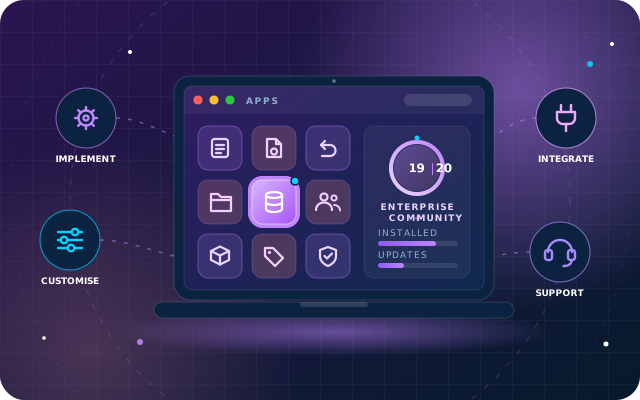
Edition and version are business decisions. Our job is to make either one work for you.
Accounting, Payroll, Studio, Documents, Helpdesk and the other Enterprise apps, configured around your processes on Odoo Online, Odoo.sh or your own servers.
We implement on Odoo 19 and Odoo 20, and upgrade existing databases with their customisations ported.
We write and maintain 50+ free modules on the Odoo App Store, so your customisations come from people who know Odoo's code.
We also build StarBiz, our AI-driven ERP, so we approach Odoo's data model, reporting and automation as ERP engineers.
Based in Ras Al Khaimah, in your time zone. We plan for UAE VAT and WPS payroll from day one.
We recommend Enterprise when its apps and support justify the subscription, and Community when it covers what you need. The same engineers deliver either.
Both editions share core apps such as CRM, Sales, Inventory and Purchase, and differ in extra apps, hosting, upgrades and cost. We implement either and tell you plainly which fits.
Who it suits: businesses that want the full suite, Studio, and Odoo's own support and upgrade service.
Adds to the shared core:
Who it suits: businesses that want open source with no licence fee and full control of hosting and code.
Our free SBS modules add:
| Area | Odoo Enterprise | Odoo Community |
|---|---|---|
| Licence model | Paid per-user subscription from Odoo | Free and open source |
| Accounting | ✓ Full Accounting app | Invoicing; SBS Account Community adds ledgers, reports, assets and budgets |
| Studio (no-code changes) | ✓ Available | Not available; changes are made in code |
| Documents and Sign | ✓ Available | Not included; SBS Document Management adds workspaces |
| Helpdesk and Field Service | ✓ Available | Not included |
| Payroll | ✓ Available, with country rules such as UAE payroll | Not included; SBS HR Payroll adds payslips and accounting entries |
| Hosting options | Odoo Online, Odoo.sh, on-premise or private cloud | On-premise or private cloud |
| Official upgrade service | ✓ Odoo migrates standard data; developers port custom modules | None; upgrades run as a migration project, for example with OpenUpgrade |
| How Star Bit Solutions helps | Implementation, Studio, custom modules, integrations and Odoo 20 upgrades | Implementation, free modules, custom development and migration-based upgrades |
Starting on Community? A Community database can move to Enterprise later, and we plan for that move from the start if it is likely. Not sure which fits? Ask for a recommendation.
A new implementation, an Odoo 20 upgrade or a stalled project: one team from discovery to support.
The full suite, rolled out around your processes on Odoo 19 or 20.
Open-source Odoo with no licence fee, extended where needed.
From Odoo 19 or older, keeping your history and customisations.
Leave another ERP or spreadsheets without losing history or momentum.
When standard Odoo is close but not right, we build the difference.
Odoo as the system of record, connected to everything around it.
Odoo kept healthy after go-live by engineers who know your setup.
Users who understand the system stop working around it.
Released in September 2026, Odoo 20 brings AI agents, agentic automation and UAE localisation changes.
Agents can be triggered by automated and scheduled actions, create records from uploaded PDFs and update records.
Ask the AI Website Assistant to create new webpages, edit forms and change menus.
Chart of accounts redesigned for IFRS and the UAE Commercial Companies Law, with 6-digit numbering and new asset models.
In Enterprise Payroll: new End-of-Service Benefit and Emiratization Compliance reports, and a plane-ticket benefit calculation.
AI features use credits bought through Odoo IAP. Full details in Odoo's release notes.
ERP projects fail on process and data far more often than on software, so our method handles both early, on either edition.
Free consultation, a walkthrough of how you work, and a scoped proposal.
Edition, apps, hosting, chart of accounts and a prototype on your sample data.
Studio configuration, custom modules and integrations in short iterations, with a demo at the end of each.
Cleaned master data, reconciled opening balances, role-based training and acceptance testing.
Supported cut-over, hypercare, then maintenance and upgrades in step with Odoo.
On either edition, we keep the Odoo core standard and add capability in separate layers, so upgrades stay possible.
Standard apps on Odoo 19 or Odoo 20, configured rather than modified. Enterprise adds apps such as Accounting, Studio and Documents.
Studio changes on Enterprise, plus custom modules and SBS modules as ordinary add-ons with their own access groups.
Payment gateways, e-commerce and banks through Odoo's API and scheduled jobs; devices through StarSense; chat through StarBot.
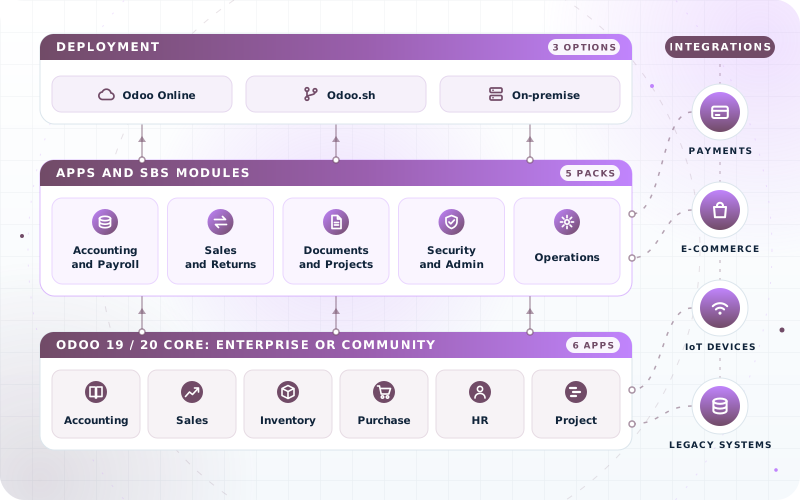
Odoo's SaaS for Enterprise: standard apps and Studio, no custom Python modules.
Odoo's cloud platform for Enterprise databases with custom modules, deployed from Git.
Either edition, on your own servers or cloud account, with full control.
SBS modules need Odoo.sh or on-premise; none is available on Odoo Online.
A trading company, a pharmacy and a contractor need very different setups on the same platform.
Multi-warehouse Sales, Inventory and Purchase, with Barcode on Enterprise. On Community, our Multi UoM and Auto Return modules add pack pricing and exchanges.
Point of Sale, Inventory and Purchase, with Documents on Enterprise for licences. On Community, SBS Pharmacy Management adds medicine data and a daily sales report.
Explore all industries we serve
Open source on the official Odoo App Store, built and tested on Odoo 19 Community. SBS Account Community and SBS HR Payroll are Community-only. Upgrading to Odoo 20? We port the modules you use as part of the project, and you can ask for an Odoo 20 version of any module.
Ledgers, trial balance, aged balances, day, cash and bank books, tax report, fixed assets, budgets, follow-ups, fiscal-year locks and recurring payments for Odoo Community.
Module detailsAdds product information to journal entries and journal items, so accountants can see and manage the products behind each posting.
Module detailsRestores the one-click Create Bill button on Odoo 19 purchase orders using Odoo's own billing logic. A single view patch with nothing to migrate.
Module detailsIdentified returns, unidentified returns and exchanges on one record with two-step approval, automatic stock transfers, credit notes, replacement invoices and net settlement.
Module detailsOne button on the sales order validates the delivery, posts the invoice and registers payment as a single amount, a credit sale or a split across journals.
Module detailsSet discounts on sales order lines as a percentage or a fixed amount, so quotations match the way your sales team actually negotiates.
Module detailsSell the same product by unit, box or pallet with a price per packaging. Stock stays in base units; ratio and price are frozen on every document.
Module detailsBridge module that hides the Auto Invoice button on exchange replacement orders when SBS Auto Return and SBS Auto Delivery/Invoice are both installed, so the same goods are never invoiced twice.
Module detailsBridge module that lets SBS Auto Return process returns and exchanges for products sold in multiple packaging units through SBS Multi UoM.
Module detailsBridge module that carries fixed or percentage discounts from SBS Sales Discount Amount onto SBS Auto Return credit notes, shared proportionally on partial returns.
Module detailsSalary rules, structures, payslips and batches for Odoo Community, with journal entries posted to accounting and manager-only overrides that keep an audit trail.
Module detailsExtends the employee form with additional personal and professional details, so HR keeps one complete master record in Odoo.
Module detailsLets employees raise purchase and internal transfer requisitions through a secure, permission-based flow before anything reaches purchasing or the warehouse.
Module detailsWorkspaces with access levels, documents that track their own expiry dates, document requests, letter templates with approval and expiring share links.
Module detailsPuts every delivery fact on the project record: team, client contact, technical details, AMC period, financials, review sessions and task timers.
Module detailsScheduled backups to eight destination types, local and cloud, with SHA-256 integrity records and no master password stored anywhere.
Module detailsAdministrator control over menus, model operations, chatter features, logins and attachments, so each role sees and does only what it should.
Module detailsBusiness credentials stored against a project or employee, encrypted with a key that never enters the database, identity-checked on reveal and logged on every view.
Module detailsAdministrator-only tools that clear sales, purchase, inventory or accounting transactions for the active company in one all-or-nothing run, keeping master data intact.
Module detailsMedicine master data on the standard product form, plus a fail-closed daily sales report split into cash, card, credit, insurance and branch.
Module detailsWeighing Community plus modules against Enterprise? Compare the editions, or read the accounting reports Odoo Community leaves out.
Tell us where you are: spreadsheets, another ERP, Community, Enterprise or an older version due for Odoo 20. We reply with a recommended edition, a rollout order and an honest estimate.
A few details are enough. An Odoo engineer will reply.
Yes. We implement Odoo Enterprise end to end on Odoo 19 or Odoo 20: process mapping, app selection, Studio configuration, custom modules, integrations, data migration, training and support. See Odoo Enterprise implementation.
Yes. On Enterprise, Odoo's upgrade service migrates standard data while we port and test your custom modules. Community has no official upgrade service, so we run a migration project, for example with OpenUpgrade tools. Either way, we port the SBS modules and other customisations you use. See Odoo 20 upgrades.
Choose Enterprise if you need apps such as full Accounting, Payroll, Studio, Documents or Helpdesk, or want Odoo's own support and upgrade service. Choose Community for open source with no licence fee, extended with modules. A Community database can move to Enterprise later. Send us your requirements for a recommendation with reasons.
They are built and tested on Odoo 19 Community, and each module's Odoo App Store page shows the Odoo versions it is published for. SBS Account Community and SBS HR Payroll are Community-only, because Enterprise has its own Accounting and Payroll apps; ask us about the others. When we upgrade a client to Odoo 20, we port the modules they use, and anyone needing an Odoo 20 version can ask.
All of them. Odoo Online is Odoo's SaaS for Enterprise: standard apps and Studio, no custom Python modules. Odoo.sh is Odoo's cloud platform for Enterprise databases with custom modules. On-premise or a private cloud suits either edition. The SBS modules need Odoo.sh or on-premise.
Yes. All our modules are free on the official Odoo App Store. We earn from implementation, customisation and support, which you only buy if you want it.
Yes. Every module is open source, so you may use, study and adapt the code under the terms of its licence, which is shown on each module's Odoo App Store page. We can also make changes for you.
Book a free consultation. We will review your setup, recommend the edition, apps and hosting that fit, and map your route to Odoo 20.
Tell us about your business and we will recommend the right starting point, free of charge.