
The adaptive learning platform that meets every learner where they are.
StarLearn is an AI-powered adaptive learning platform that adjusts lessons, quizzes and assessments to each learner's pace, strengths and knowledge gaps. Educators see progress as it happens and can step in before a struggling learner falls behind.
One pace for thirty learners is no pace at all
A classroom, a lecture hall or a training cohort moves at a single speed. Some learners are bored, others are lost, and the educator finds out at exam time. StarLearn gives each learner a path and each teacher a live view.
One-pace-fits-all lessons
Everyone receives the same lesson at the same speed, whatever they already know. StarLearn sequences content by demonstrated mastery, so confident learners move on and others get more practice.
Late insight into struggling learners
Most gaps surface at the end-of-term exam, when it is too late to act. StarLearn flags a slipping learner after a handful of interactions, not after a term.
Manual grading
Educators spend evenings marking instead of planning. Auto-marked quizzes and assessments return results instantly and feed the analytics the teacher already uses.
Disengagement
Learners switch off when material is too easy or too hard. Adaptive difficulty keeps each learner where effort pays off, with progress they can see for themselves.
Six capabilities, one adaptive learning platform
StarLearn covers the whole loop: what to teach next, how to teach it, how to check understanding and how to show educators what happened.
Personalised learning paths
Every learner starts with a profile built from a placement assessment, prior activity and educator input. StarLearn then recommends the next lesson, skill or revision block for that learner alone.
- Placement assessment to seed the initial profile
- Next-step recommendations updated after every activity
- Remediation loops when a prerequisite skill is weak
- Stretch content for learners who are ahead
- Educator overrides to pin, reorder or skip items
- A path view learners can see and understand
What learners notice first
The next task is always the right size: not a repeat of what they already know, not a leap they cannot make. Progress is visible, so effort feels worthwhile.
Ask for a walkthroughAdaptive lessons and assessments
Lessons and assessments respond to answers as they arrive. Difficulty, hints and follow-up items change with what the learner has just shown, not a fixed script.
- Difficulty tuning per question from recent responses
- Hints and worked examples offered when a learner hesitates
- Branching lessons that revisit a concept from a new angle
- Adaptive assessments that shorten once mastery is clear
- Mastery scoring per skill rather than a single grade
- Spaced review scheduled for skills at risk of fading
How the AI decides
Knowledge tracing estimates the probability that a learner has mastered each skill and updates it with every response. Difficulty tuning then chooses the item most likely to teach, not merely to test.
See the adaptive engineInteractive quizzes and skill tracking
Short, frequent quizzes do more for retention than one long exam. StarLearn makes them quick to build, automatic to mark and useful to analyse.
- Multiple choice, multiple answer, true/false and short text items
- Numeric, ordering and matching question types
- Randomised item pools and answer order
- Skill tags on every item for granular tracking
- Skill heatmap per learner and per cohort
- Certificates issued when a path or course is completed
Skill tracking, not just scores
A score of 70% hides which 30% is missing. Skill tracking shows the exact concepts a learner has not yet mastered, so the next lesson targets those, and so does the teacher.
Talk to us about your assessmentsEducator dashboards and progress monitoring
Educators get a live view of every learner and cohort, with intervention prompts that name the learner and the skill, so support can start the same day.
- Cohort overview: progress, activity and mastery at a glance
- Learner drill-down with attempt history and time on task
- At-risk flags for inactivity, low mastery or repeated errors
- Intervention notes and follow-up tasks per learner
- Skill-level reports for lesson planning
- Exportable reports for leadership and guardians
What educators notice first
The Monday morning question changes from "how did the class do" to "which three learners need me this week, and on what". The dashboard has already answered it.
Book an educator demoContent library and authoring
Bring the material you already have and build the rest inside StarLearn. The authoring tools are made for teachers and trainers, not developers.
- Upload video, documents, slides and links in common formats
- Build lessons from blocks: text, media, examples and checks
- Question editor with skill tagging and difficulty hints
- Reusable content library shared across courses
- Versioning so updates do not break live paths
- Bulk import of question banks from spreadsheets
Your curriculum, your structure
StarLearn does not impose a curriculum. We map your syllabus, competency framework or training plan to skills and prerequisites during implementation, then your team maintains it.
See the implementation stepsAccessible and multilingual by design
Learning that only works for some learners is not adaptive. StarLearn is built for keyboard and screen-reader users, learners with low vision and classes that work in more than one language.
- Full keyboard navigation across lessons and quizzes
- Screen-reader friendly structure and labels
- High-contrast mode and scalable text
- Captions and transcripts alongside media
- Arabic and English interface
- Works on desktop, tablet and mobile browsers
Bilingual classrooms
Schools and training teams in the UAE and the region often teach in Arabic and English together. Learners switch interface language, and authors provide the same content in both.
Education and other sectors we serveHow the adaptive engine decides
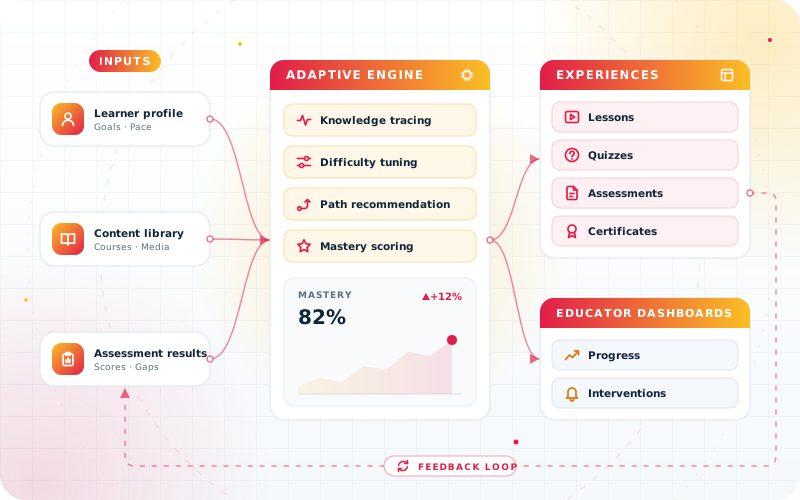
StarLearn is organised as four layers. Inputs describe the learner and the content, the adaptive engine reasons about them, experiences deliver the result, and dashboards show educators what happened.
Inputs
A learner profile built from placement, history and preferences, a content library tagged by skill and prerequisite, and assessment results from every attempt.
Adaptive engine
Knowledge tracing estimates mastery per skill. Difficulty tuning picks the next item, path recommendation orders the lessons, and mastery scoring decides when a skill is done.
Experiences
Lessons, quizzes, assessments and certificates delivered in the browser on desktop, tablet and mobile, in Arabic or English, with feedback at every step.
Educator dashboards
Progress, mastery and at-risk signals per learner and cohort, with intervention tools that write back into the learner profile and close the loop.
- Architecture
- Modular, skill-based data model, adaptive engine
- Deployment
- Cloud hosted, institution branding
- Roles
- Learner, educator, administrator, guardian
- Interface
- Arabic and English, responsive web on desktop, tablet and mobile
- Content and reporting
- Video, documents, slides, quizzes and links; live dashboards and exportable reports
Built for classrooms, campuses and training rooms
The same adaptive engine, configured for very different settings. These are the four it is designed for.
K-12 schools
Differentiated instruction without thirty lesson plans. Learners work at their own level in maths, science and languages while teachers see who needs help today.
- Differentiation
- Homework
- Revision
- Guardian view
Higher education
Large modules with mixed prior knowledge. Placement diagnostics, adaptive revision before exams and analytics that show a lecturer which topics the cohort has not grasped.
- Placement
- Revision
- Cohort analytics
- Certificates
Vocational and corporate training
Onboarding, compliance and skills programmes where completion matters and time is short. Adaptive assessments shorten the course for people who already know the material.
- Onboarding
- Compliance
- Skills matrix
- Certificates
Tutoring centres
One tutor, many learners, many levels. StarLearn runs the practice between sessions and tells the tutor exactly what to cover next, across every branch.
- Practice
- Progress reports
- Multi-branch
- Guardian updates
Goals we agree with every StarLearn rollout
We do not promise a percentage. We agree measurable goals with your team at the start and review them every cycle. These are the goals we suggest starting from.
Earlier intervention
Identify a struggling learner within days of the first signs, not at the end of term.
Less time marking
Return marking hours to lesson planning and one-to-one support by auto-marking routine quizzes and assessments.
Higher engagement
Keep learners in the range where tasks are challenging but achievable, and make their own progress visible to them.
Consistent mastery
Move learners on when a skill is mastered rather than when the calendar says so, and close gaps before they compound.
Confident reporting
Give leadership and guardians progress reports drawn from live data rather than reconstructed at term end.
Better use of content
Learn which lessons and questions actually teach, and improve or retire the ones that do not.
Want to draft these goals for your institution? A 30-minute call is enough. Book a discovery call, message us on WhatsApp or call +971 55 973 4524.
Safe for learners, simple for IT
An education platform holds data about young people and staff. StarLearn treats role-based access, institution controls and data protection as defaults, and is hosted so your IT team has little to run.
Accessibility
Keyboard navigation, screen-reader friendly structure, high-contrast mode and scalable text across lessons, quizzes and dashboards.
Multilingual
Arabic and English interface, with course content in more than one language, so bilingual programmes run in a single system.
Role-based access
Learner, educator, administrator and guardian roles with permissions on every record. A teacher sees their classes; a parent sees their own child.
Institution and parental controls
Institutions decide what learners can see, share and message. Guardians get progress views and notifications without access to other learners.
Data protection
Encrypted connections, scheduled backups, retention rules you define, and export or deletion on request under your own data policy.
Cloud deployment and branding
Hosted in the cloud and managed by us, with your logo, colours and naming, so learners see your institution rather than ours.
From syllabus to first cohort in four steps
An adaptive platform is only as good as the skill map behind it. We build that map first, and your academic or training team works directly with our engineering team.
Content mapping
We map your syllabus, competency framework or training plan to skills and prerequisites, then import and tag your existing content.
Pilot cohort
One class, one module or one training group runs on StarLearn for a few weeks, with educators giving feedback every week.
Rollout
Remaining cohorts join in waves, with training for educators, administrators and, where relevant, guardians.
Review cycles
Each term or quarter we revisit the goals set at the start, tune the skill map and content, and plan the next improvements.
See StarLearn adapt to your learners
Send us a syllabus, a sample quiz or a description of your cohort. We will build a short demo path around it and walk your team through it in 30 minutes.
- Demo built on your subject, level and language
- Honest scope, timeline and pricing before any commitment
- Advice from the engineers who will implement it
Request a StarLearn demo
Tell us a little about your learners and we will come back within one business day.
StarLearn, answered
Is StarLearn suitable for schools as well as corporate training?
Yes. The same adaptive engine is configured for K-12 schools, universities, vocational and corporate training teams and tutoring centres. Only the skill map, content and roles change, and we set those up with you.
How does StarLearn personalise learning for each student?
StarLearn builds a profile from a placement assessment, prior activity and educator input, then estimates mastery per skill with every response. That estimate drives the next lesson, question difficulty and review schedule, and educators can override any step.
Can we use our existing lessons, videos and question banks?
Yes. Video, documents, slides, links and question banks in common formats are imported into the content library and tagged by skill. Additional lessons and quizzes are built inside the platform with the authoring tools.
What do educators see, and how quickly?
Dashboards update as learners work. Educators see cohort progress, mastery per skill, time on task and at-risk flags, drill into any learner's attempt history and record interventions in the same place.
Is StarLearn accessible and available in Arabic?
Yes. The interface is available in Arabic and English, supports keyboard navigation and screen readers, offers a high-contrast mode and scalable text, and works on desktop, tablet and mobile browsers.
How is learner data protected?
Access is role-based, so teachers, administrators, learners and guardians each see only what they should. Connections are encrypted, backups are scheduled, and retention and deletion follow the policy you define. See our privacy policy for how we handle personal data.
How do we get started with StarLearn?
Book a free consultation. We review your syllabus or training plan, propose a pilot cohort and give you a scoped plan with timeline and pricing before any commitment.
Ready to give every learner their own path?
Book a free consultation. We will map your syllabus or training plan to StarLearn and show you a working demo within days, with no obligation.