
Odoo Enterprise, implemented around how you work.
Star Bit Solutions delivers Odoo Enterprise implementation on Odoo 19 and Odoo 20 for businesses in the UAE and the GCC. We configure Accounting, Studio, Documents, Helpdesk, Payroll and the other Enterprise apps around your processes, on Odoo Online, Odoo.sh or your own servers.
Why businesses choose Odoo Enterprise
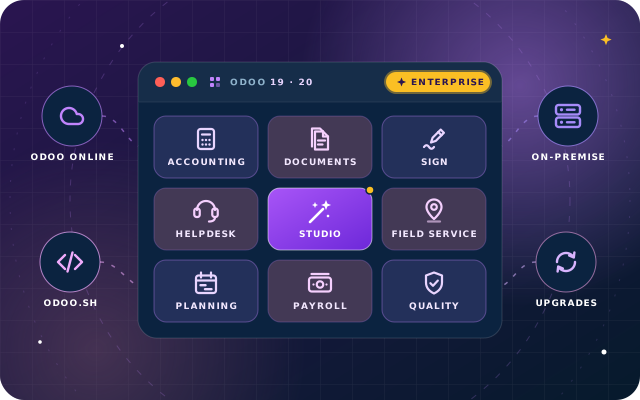
Odoo Enterprise is Odoo's paid, per-user subscription edition. It adds full Accounting, Studio, Documents, Sign, Helpdesk, Field Service, Payroll and more to the Community apps, plus Odoo's own support and upgrade service.
One system, finance to field service
Quotes, stock, invoices, payroll, tickets and on-site jobs share one database, so finance closes from the records operations already keep.
No-code changes with Studio
Add fields, adjust forms, build reports or small apps with Odoo Studio, without code. Studio works on every hosting option, including Odoo Online.
Hosting run by Odoo
Odoo Online and Odoo.sh are run by Odoo, so your team has no servers to maintain. On-premise remains an option when data must stay in-house.
An official upgrade path
Odoo publishes one major version a year. For Enterprise databases, its upgrade service migrates the standard data and developers port the custom modules, so reaching Odoo 20 is a planned step, not a rebuild.
Enterprise or Community? Through OdooStar, our Odoo practice, we implement both and recommend on the merits. When you need full Accounting, Payroll, Helpdesk, Field Service or Studio, Enterprise is usually the shorter road.
The Enterprise apps, configured for your teams
What each area of Odoo Enterprise adds, and what changes once it is live.
Finance and administration
Full accounting replaces Community's Invoicing app, with documents, signatures and approvals around it.
- Accounting: bank reconciliation, financial statements, multi-currency and VAT reporting
- Documents: invoices, contracts and HR files, linked to their records
- Sign: quotes, contracts and offer letters signed electronically
- Spreadsheet dashboards: management dashboards on live Odoo data
- Approvals: purchase, payment and other requests, with a full approval trail
What changes for finance
Month-end runs from one ledger fed by sales, purchases, stock and payroll, so closing becomes checking rather than re-keying. Contracts are signed and filed without paper.
See the UAE accounting featuresOperations and manufacturing
Stock, production and field work in the same system as sales and accounting.
- Inventory with Barcode: receipts, picking, packing and counts by scanner
- Manufacturing with PLM: engineering changes to bills of materials, approved and versioned
- Quality and Shop Floor: quality checks, and work orders run from a tablet at the work centre
- Field Service: on-site jobs scheduled, recorded and invoiced; on Odoo 20 these features are part of the Planning app, with a live technician map and automatic planning by customer location
- Planning: people and equipment scheduled on a Gantt board
What changes for operations
Warehouse staff scan instead of typing, production follows the approved bill of materials, and technicians close jobs on site, so stock and cost figures hold up.
Sales, marketing and customer service
From first lead to renewal and support ticket, on one customer record.
- CRM and Sales: pipeline, quotations and orders, linked to stock and invoicing
- Subscriptions: recurring contracts invoiced on schedule, with renewals and upsells
- Rental: orders with pickup, return and availability tracking
- Helpdesk: tickets from email and the portal, with SLA policies
- Marketing Automation: campaigns that react to what each contact does
- WhatsApp: template messages and replies from inside Odoo
What changes for customers
Sales sees open tickets before calling, renewals and rentals are invoiced on time, and support answers from the order history.
People and payroll
Enterprise adds Payroll, Appraisals and Planning to the Employees, Time Off and Recruitment apps.
- Payroll: salary structures, payslips and journal entries; UAE payroll is part of Enterprise Payroll
- Appraisals: appraisal cycles, goals and feedback for every employee
- Planning: shift rosters for staff, shared with operations
What changes for HR
Payroll runs from contracts and time off already in Odoo and posts to accounting in one step. On Odoo 20, UAE payroll gains an End-of-Service Benefit report and an Emiratization Compliance report.
See UAE payroll on Odoo 20Platform apps
No-code changes, internal knowledge, calls, devices and, on Odoo 20, agentic automation.
- Studio: fields, forms, reports, automations and small apps without code
- Knowledge: procedures, policies and how-to articles
- Phone: calls from any record, logged on the customer's history
- IoT: scales, printers, scanners and measuring devices
- AI on Odoo 20: agents triggered by automated or scheduled actions, records created from uploaded PDFs and a database connection via MCP; all AI features use credits bought through IAP
What changes for IT
Many change requests become Studio changes your administrator can make. When code is needed, we write a proper module, which keeps the next upgrade predictable.
Studio or custom code? How we decideUAE VAT, FTA and MoHRE requirements, configured in Odoo
Odoo's UAE localisation provides the features; we configure them, test them on your data and train your team. Odoo 20 adds several UAE updates.
VAT-ready accounting
UAE VAT taxes, fiscal positions and VAT reporting configured in Odoo Accounting and tested on your own transactions.
FTA VAT audit file
Odoo generates the FTA VAT audit file from the general ledger on Odoo 19 and Odoo 20; we map your accounts and taxes so it reflects your books.
IFRS-aligned chart of accounts
A chart redesigned for IFRS and the UAE Commercial Companies Law, with a 6-digit structure and new asset models. We set it up or map your chart to it.
WPS export aligned with MoHRE
The UAE WPS export is aligned with MoHRE regulations on Odoo 19 and Odoo 20. UAE Payroll is part of Odoo Enterprise Payroll, so this needs the Payroll app.
End-of-service and benefits
An End-of-Service Benefit report, benefit contributions revised per GPSSA and ADPF, DIFC Employee Workplace Savings, improved overtime calculations and a new plane-ticket benefit calculation.
Emiratization Compliance report
A new report per MoHRE in UAE Payroll. We configure the employee data it depends on and show HR how to read it.
Odoo builds these features and we configure them. For the rest of the release, see Odoo's release notes; for upgrade planning, see our Odoo 20 page.
Hosting and licensing, decided before you buy
Hosting decides who runs the servers and whether custom code is possible, so we settle it with you before you subscribe.
Odoo Online
Odoo's own SaaS for Enterprise, with Odoo running the servers.
Fits when standard apps and Studio cover your processes and you want no servers to manage.
Custom code is not possible: custom Python modules, including our free SBS modules, cannot be installed.
Odoo.sh
Odoo's cloud platform for Enterprise databases.
Fits when you want Odoo to host the database but need custom modules, integrations or add-ons from the Odoo App Store.
Custom code is supported, deployed from Git and tested on separate branches before production.
On-premise or private cloud
Your own servers or a cloud provider you choose, for Enterprise or Community.
Fits when data must stay on your infrastructure, or IT needs full control over servers, network and backups.
Custom code is supported without platform limits. Servers, security patches and backups stay with your IT team, and we can agree a support arrangement around them.
Four questions before you subscribe
Odoo Enterprise is a per-user subscription, contracted with Odoo. We settle these with you first, so you buy what you need at go-live and add apps later.
- Which apps you need now, and which can wait
- How many people need a user account
- Which hosting fits your data, code and IT policies
- Whether to start on Odoo 19 or Odoo 20
Configuration first, Studio second, code last
Most requirements are met by configuring standard apps. For the rest, choose Studio or a custom module based on the change, your hosting and how the logic will evolve.
Use Studio when
- you need new fields, form changes or a new report layout
- an automation or an approval step covers the rule
- your own administrator should own the next change
- you are on Odoo Online, where custom code cannot be installed
Use a custom module when
- the logic involves complex calculations or heavy data processing
- Odoo must exchange data with another system
- the change needs version control, code review and automated tests
- you are on Odoo.sh or on-premise, where modules can be installed
Every customisation we deliver is documented, Studio or code, so at the next Odoo version you know what developers must port and what Odoo's upgrade service covers.
How we run an Odoo Enterprise implementation
Eight stages, each with something you can see and sign off.
Discovery
A free consultation, then workshops on how each team works and what you need to report.
Solution design
Apps, hosting, version, chart of accounts and workflows, written up as a scope you approve.
Configuration and Studio
Apps configured on a test database, plus Studio changes and custom modules where needed.
Data migration
Customers, vendors, products and open balances cleaned, mapped and test-loaded before the final import.
Integrations
Banks, payment providers, e-commerce and devices connected through Odoo's APIs.
Training
Role-based sessions for each team, plus administrator training on users, access rights and Studio.
Go-live
A planned cut-over with reconciled opening balances, and engineers on hand as teams settle in.
Support
Fixes, small changes and monitoring after go-live, then the next Odoo version when you are ready.
From an older version, Community or another ERP
The route to Enterprise on Odoo 19 or Odoo 20 depends on where you start.
From an older Enterprise version
Odoo's upgrade service migrates the standard data to the new version, such as Odoo 20; we port your custom modules, including any of our free modules you use, check Studio changes and reports, and test the upgraded copy with your team.
From Odoo Community
A Community database can move to Enterprise. We install the Enterprise apps, retire the add-ons they replace, test on a copy and retrain users. SBS Account Community and SBS HR Payroll conflict with Enterprise Accounting and Payroll, so those apps take their place.
From spreadsheets or another ERP
We extract, clean and map customers, vendors, products, open items and balances to Odoo, then reconcile the totals with your finance team before go-live.
One team for your whole Enterprise project
OdooStar is the Odoo practice of Star Bit Solutions, founded in 2014 and based in Ras Al Khaimah. We deliver Odoo Enterprise projects end to end, on Odoo 19 and Odoo 20: licensing advice, Studio configuration, custom modules, integrations, data migration, training, support and upgrades.
Enterprise on Odoo 19 and Odoo 20
We implement Enterprise on Odoo Online, Odoo.sh or your own servers, move Community databases to Enterprise and upgrade older Enterprise databases to Odoo 20.
Module authors, not only configurators
We write Odoo code as well as configure it: custom modules for Enterprise on Odoo.sh and on-premise, and 50+ free, open-source modules on the Odoo App Store.
An AI background
We build our own AI products, including the StarBiz AI-driven ERP, so we know where Odoo 20's AI agents earn their IAP credits and where a plain automated action will do.
Engineers you can reach
You deal with the engineers who configure your system, by WhatsApp, phone or email, from first workshop to support.
Tell us where you are, and we will map the route to Enterprise
Wherever you are starting from, share a few details and an engineer will recommend apps, hosting, version and next steps.
- Advice on apps, users and hosting before you subscribe
- Honest scope, timeline and pricing before any commitment
Request an Odoo Enterprise consultation
A few details are enough. The consultation is free.
Odoo Enterprise, answered
Do we buy the Odoo Enterprise licence from you or from Odoo?
Enterprise subscriptions are contracted with Odoo. Before you buy, we help you choose the apps, users and hosting, so the subscription matches what you will use. Our implementation work is quoted separately.
Can you implement Odoo Enterprise on Odoo Online?
Yes. Odoo Online runs the standard Enterprise apps and Studio, so we implement through configuration, Studio, data imports and training. Custom Python modules, including our free SBS modules, cannot be installed there; if you need custom code, choose Odoo.sh or on-premise hosting.
Can Odoo Enterprise use custom modules?
Yes, on Odoo.sh and with on-premise or private cloud hosting; on Odoo.sh they are deployed from a Git repository. At each new major version, Odoo's upgrade service migrates the standard data and developers port the custom modules.
Can you move us from Odoo Community to Enterprise?
Yes. A Community database can move to Enterprise. We map your add-ons to Enterprise apps, rehearse the move on a copy and retrain users. SBS Account Community and SBS HR Payroll make way for Enterprise Accounting and Payroll, because they conflict with those apps.
Do you support Odoo 20?
Yes. We implement Odoo Enterprise on Odoo 19 and Odoo 20, and upgrade existing Enterprise databases to Odoo 20 with Odoo's upgrade service plus porting of custom modules. When we upgrade a client to Odoo 20, porting the SBS modules and other customisations they use is part of that project. See our Odoo 20 page for what changes.
How long does an Odoo Enterprise implementation take?
It depends on the number of apps and companies, data quality, integrations and custom code. A focused finance and sales rollout is far smaller than multi-company manufacturing with payroll. After discovery, you receive a scoped plan with a realistic timeline.
Do your free Odoo modules work on Odoo Enterprise?
Our free modules are built and tested on Odoo Community and listed for Odoo.sh and on-premise, not Odoo Online. SBS Account Community and SBS HR Payroll are Community-only: they conflict with the Enterprise Accounting and Payroll apps. For other modules, tell us your edition and apps and we will check before anything is installed. Need an Odoo 20 version of a module? Ask us.
Ready to run your business on Odoo Enterprise?
Book a free consultation. We will review how you work, recommend apps, hosting and an Odoo version, and outline the route to a live Enterprise system.