
SBS Employee Purchase Requisition: two sign-offs before anything is bought
Purchase requests sent by email leave nobody able to say who agreed to them or whether the goods arrived. This module puts each request on a record, requires two different approvers, then has Odoo generate the purchase orders and internal transfer itself.
Why teams install Employee Purchase Requisition
Odoo Community has no employee purchase requisition with enforced approval: requests travel by email, nobody can later say who agreed to them or whether the goods arrived, and purchasing retypes what was asked for. This module puts the request on a record, forces two different approvers to sign it off, and lets Odoo generate the purchase orders and internal transfer itself so the paperwork can never disagree with what was approved.
Who it is for: Companies on Odoo 19 Community whose staff request equipment, supplies or stockroom items and whose finance or purchasing teams need an auditable two-person sign-off before any purchase order or internal transfer is created.
No self-approved purchases
The requester cannot approve their own requisition, and final approval must come from a different user from the department approver.
Paperwork matches what was approved
Odoo generates one purchase order per vendor and one internal transfer from the approved requisition, so nobody retypes what was asked for.
A trail from request to receipt
Each generated document carries the requisition reference, rejections record who and when, and the request only closes once every order is received and every transfer validated.
What Employee Purchase Requisition adds to Odoo 19
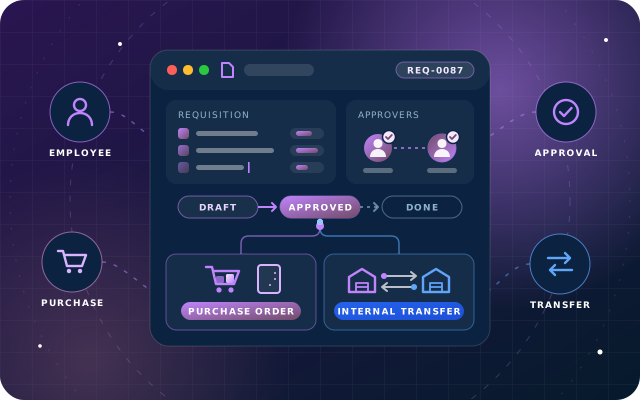
Employees ask, two approvers sign off, Odoo writes the POs and transfer itself.
Three columns and a reason
The employee picks a product, says how many and explains why. Vendor, stock location and operation type are somebody else's job, and employee, department and requester fill themselves in from the logged-in user.
Six-state approval chain
Draft, Department Approval, Final Approval, Approved, Documents Created and Received, each with a named owner: the employee, the department manager, a requisition manager, and Odoo itself for document creation.
Department manager prices it up
The department manager marks each line as a purchase or an internal transfer and chooses the vendor. Those line edits save directly from the form during Department Approval.
Separation of duties enforced
The requester cannot approve their own requisition, the department approver cannot be the requester, and final approval must be performed by a different user from the department approver.
Vendor required from the product's own list
Approval is refused until every purchase line has a vendor chosen from that product's own vendor list, so a purchase order never goes to an unlisted supplier.
One purchase order per vendor
Lines are grouped by vendor, so each vendor gets one order rather than one per line, each stamped with the requisition reference and reachable from the record.
Internal transfer for stockroom items
Lines already sitting in the stockroom become one internal transfer drawn from the department's source location and delivered to the employee's destination location.
Odoo writes the documents, not a person
Pressing Create PO and Transfer generates the purchase orders and transfer automatically. Manually created purchase orders carrying a requisition link, and attaching a requisition to an existing order, are refused.
Received only when everything is complete
Mark Received is refused until every generated order is fully received and every transfer validated; receipt is derived from completed documents rather than a checkbox.
Rejection and cancellation with a trail
Rejection is available at both approval stages and records who rejected it and when. Cancellation is available while the request is still draft or waiting on the department.
Managers see their own department only
A record rule limits each internal user to the requisitions they raised and the ones belonging to the department they manage; there is no all-requisitions view for an ordinary manager.
Locked after submit
After Submit the request is locked with the department manager and the requester keeps only Print PDF. Approved workflow records can only be changed through their actions.
No deleting once paperwork exists
A requisition with generated documents cannot be deleted, so the audit trail from request to purchase order and transfer stays intact.
Two configuration fields, one group
Each department can name the stock location internal transfers are drawn from, each employee can name where their goods should end up, and both fall back to the warehouse stock location. Final approval rights come from the SBS Employee Requisition Manager group.
Readable references and printed report
Requisitions display and search by their reference, such as EPR00002, on purchase order and transfer forms, and each requisition prints as a PDF report.
Tested end to end on Odoo 19 Community
We tested every workflow on this page end to end on a live Odoo 19 Community database. Multi-company use has not been tested yet.
Free and open source
Free to install. It depends on the standard Employees, Discuss, Purchase, Inventory and Invoicing apps.
From install to everyday use
Install SBS Employee Purchase Requisition on Odoo 19 with the Employees, Discuss, Purchase, Inventory and Invoicing apps, and add final approvers to the SBS Employee Requisition Manager group.
Optionally set each department's source stock location and each employee's destination location; both fall back to the warehouse stock location.
An employee (an internal user linked to an employee with a department) creates a requisition: employee, department and requester fill in automatically, and they add product, description, quantity and the reason.
The employee presses Submit. The request locks, sits with the department manager, and the requester keeps only Print PDF.
The department manager (whose employee record is linked to a user) marks each line as purchase or internal transfer, picks a vendor from the product's own vendor list, and presses Department Approve, or Reject.
A different user in the SBS Employee Requisition Manager group gives Final Approval, or rejects it; the same person cannot approve both stages.
The requisition manager presses Create PO and Transfer: Odoo generates one purchase order per vendor plus one internal transfer, all stamped with the requisition reference and reachable from the record.
Purchasing receives the orders and the warehouse validates the transfer as usual in Odoo.
Once every generated order is fully received and every transfer validated, the requisition manager presses Mark Received to close the requisition.
What you will see in Odoo
- A new requisition. Employee, department and requester fill themselves in from the person logged in.
- Requisition lines. Product, description and quantity. The vendor and type columns stay empty at this stage.
- Submitted. After Submit the request is locked and sits with the department manager. The requester keeps only Print PDF.
- Department manager view. The department manager gets Department Approve and Reject - and no final approval.
- Vendor required. Approval is refused until every purchase line has a vendor chosen from that product's own vendor list.
- Documents created. After Create PO and Transfer: two purchase orders and one internal transfer, reachable from the record.
SBS Employee Purchase Requisition explained
Let staff ask for what they need, and make sure two people sign it off. Employees raise a requisition. Their department manager prices it up and approves it. A second, different approver releases it. Only then does Odoo create the purchase orders and the internal transfer - one purchase order per vendor, linked back to the request.
The request that arrives as an email. Somebody needs four chairs and a couple of desk lamps. They email their manager. The manager forwards it to purchasing. Purchasing asks which vendor, and whether it was approved. Two weeks later nobody can say who agreed to it, or whether it ever arrived.
This module puts that conversation on a record. The employee states what they need and why. The department manager decides whether each line is a purchase or something already sitting in the stockroom, and picks the vendor. A separate approver releases it, and Odoo then produces the paperwork itself.
For the employee: three columns and a reason. The person asking is not asked to know the vendor, the stock location or the operation type. They pick a product, say how many, and explain why. Everything else is somebody else's job. Employee, department and requester fill themselves in from the person logged in, and after Submit the request is locked and sits with the department manager.
For the department manager: they see their own department, and nothing else. A record rule limits each internal user to the requisitions they raised and the ones belonging to the department they manage. There is no 'all requisitions' view for an ordinary manager. The department manager gets Department Approve and Reject - and no final approval.
Release and paperwork: Odoo writes the documents, not a person. After Create PO and Transfer, the generated purchase orders and the internal transfer are reachable from the record. Lines are grouped by vendor, so each vendor gets one order rather than one per line.
Controls: what the module refuses to do. Only the employee's department manager can give Department Approval, so the requester cannot approve their own requisition. Only an SBS Employee Requisition Manager can give final approval, and it must be a different user from the department approver. Requisition purchase orders must be generated by the requisition action, so a hand-made purchase order carrying a requisition link is refused, and a requisition cannot be attached to an existing purchase order. A requisition with generated documents cannot be deleted. After Submit, the record can only be changed through its workflow actions, and receipt is derived from completed documents rather than marked by hand.
We tested every workflow on this page end to end on a live Odoo 19 Community database. Multi-company use has not been tested yet.
Requirements and compatibility
Everything your Odoo administrator needs to know before installing SBS Employee Purchase Requisition.
- Technical name
sbs_employee_purchase_requisition- Odoo version
- 19.0, built and tested on Community Edition
- Price
- Free
- Hosting
- Odoo.sh, On Premise (not available on Odoo Online)
- Required Odoo apps
- Discuss (mail), Employees (hr), Inventory (stock), Purchase (purchase), Invoicing (account)
- Module dependencies
hr, mail, purchase, stock, account- Access roles
- Employee / requester (an internal user linked to an employee with a department; creates, submits and prints their own requisitions); Department manager (a manager whose employee record is linked to a user; Department Approve and Reject for their own department, no final approval); SBS Employee Requisition Manager (final approval, Create PO and Transfer, Mark Received)
Installation
Download SBS Employee Purchase Requisition from the Odoo App Store, or add it to your Odoo.sh repository or on-premise addons path.
In Odoo, activate developer mode, open Apps, choose Update Apps List and search for
sbs_employee_purchase_requisition.Install the module. Odoo installs the required apps listed above automatically.
Assign the access roles to the right users, then follow the configuration notes.
Configuration and requirements
- Make sure each requester is an internal user linked to an employee record that has a department.
- Make sure each department has a manager whose employee record is linked to a user, since only that manager can perform Department Approval.
- Add the users who give final approval to the SBS Employee Requisition Manager group; the final approver must be a different person from the department approver.
- On each department, optionally name the stock location internal transfers are drawn from (falls back to the warehouse stock location).
- On each employee, optionally name the destination location where their goods should end up (falls back to the warehouse stock location).
- Keep each product's vendor list up to date, because department approval is refused until every purchase line has a vendor chosen from that product's own vendor list.
Odoo 20 or Odoo Enterprise? Check the Odoo App Store for the Odoo versions SBS Employee Purchase Requisition is available for. When we upgrade a database to Odoo 20 we port the SBS modules and other customisations it uses, and we implement Odoo Enterprise as well as Community. See what Odoo 20 changes.
Need help rolling out purchase requisitions in Odoo?
The engineers who wrote SBS Employee Purchase Requisition can install it, configure it for your processes, extend it and support it. The module is free; you only pay for the help you choose.
- Installation on Odoo.sh or your own servers
- Configuration, data migration and user training
- Custom changes and integration with your other modules
- Support from the team that maintains the code
- Running Odoo Enterprise? We implement Enterprise too, and will tell you whether this module or a standard Enterprise app fits better
- Moving to Odoo 20? We port this module and your other customisations as part of the upgrade
Get help with Employee Purchase Requisition
Tell us about your Odoo setup and what you need. We reply within one business day.
Employee Purchase Requisition, answered
Which Odoo apps does SBS Employee Purchase Requisition depend on, and where can it run?
It depends on Discuss (mail), Employees (hr), Inventory (stock), Purchase (purchase) and Invoicing (account). It targets Odoo 19.0 and we tested it on Community Edition. It is available for Odoo.sh and on-premise installations, not Odoo Online.
Who can approve a requisition, and can one person do both approvals?
Department Approval can only be given by the employee's department manager, who cannot be the requester. Final approval can only be given by a member of the SBS Employee Requisition Manager group, and it must be performed by a different user from the department approver. The requester can never approve their own requisition.
What does Odoo generate when the requisition is approved?
When a requisition manager presses Create PO and Transfer, Odoo produces one purchase order per vendor (lines are grouped by vendor) plus one internal transfer for the stockroom lines, each stamped with the requisition reference and reachable from the record. Purchase orders created by hand carrying a requisition link are refused.
What setup is needed before employees can use it?
The requester needs an internal user linked to an employee with a department, and the department needs a manager whose employee record is linked to a user. Optionally, each department can name the stock location internal transfers are drawn from and each employee can name where their goods should end up; both fall back to the warehouse stock location.
When can a requisition be marked as received or deleted?
Mark Received is refused until every generated order is fully received and every transfer validated, because receipt is derived from completed documents. A requisition with generated documents cannot be deleted, and after Submit the record can only be changed through its workflow actions.
Can Star Bit Solutions install and customise SBS Employee Purchase Requisition for us?
Yes. The engineers who wrote SBS Employee Purchase Requisition can install it on Odoo.sh or your own servers, configure it for your processes, extend it and support it. The module itself is free; you only pay for the implementation or support you choose. Call or WhatsApp +971 55 973 4524 or email info@starbitsolutions.com.
Put Employee Purchase Requisition to work in your Odoo.
Install it free from the Odoo App Store, or let our engineers deploy, configure and support it alongside the rest of your Odoo setup.