The Challenge
The client designs and builds office and commercial furniture: desks, storage, seating and fitted joinery for offices, hotels and fit-out contractors. Work passes through its own metal workshop, a panel and wood shop, a powder coating line, an upholstery section and final assembly, and many orders mix standard ranges with project-specific variations.
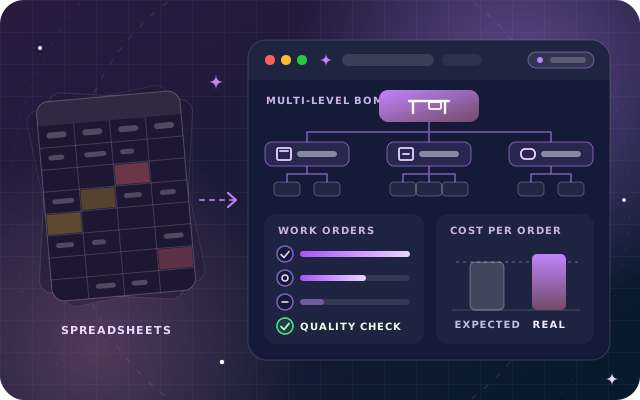
Every product lived in a spreadsheet. Each range had its own workbook of parts, quantities and cutting notes, and the estimator, the buyer and the production supervisor each kept a slightly different copy. When a design changed, nobody could say for certain which version the workshop had followed, and shared parts such as frames and drawer units were typed again by hand in every file that used them.
Cost was the bigger worry. Quotations were priced from standard costs that had not kept pace with steel and board prices, and finance only learned what an order had actually cost when it allocated materials and labor at month-end. By then the margin on a project order was history rather than something the team could still protect. These are the challenges we meet most often in Manufacturing:
- Bills of materials in spreadsheets, with no single approved version
- Sub-assemblies rebuilt by hand in every product file
- No record of how long each operation really took in each workshop
- Quality problems found at installation instead of at the workbench
- Actual cost per order known only after month-end
Our Approach
Our OdooStar team began with walk-throughs of every workshop, following a standard desk and a project order from quotation to delivery. We mapped how drawings, parts lists, purchase requests and production instructions really moved, and noted which decisions depended on which spreadsheet.
The fit-gap was short. Standard Odoo Enterprise apps covered bills of materials, work orders, quality checks and costing, so the plan relied on configuration rather than custom code. The remaining gaps, mainly extra fields the workshop wanted on work orders and a clearer layout for production documents, were handled in Studio.
We agreed a phased plan with the client:
- Products, units of measure, work centers and the bill of materials structure, prototyped on a test database with the best-selling desk range
- Migration of the remaining ranges, with Inventory and Purchase switched on
- Work orders, Shop Floor and quality control points, rolled out workshop by workshop
- Costing reviewed with finance on real orders before the old spreadsheets were retired
Data took the most effort. Each spreadsheet BoM was cleaned, duplicate parts were merged, and shared sub-assemblies such as frames, drawer units and cushion sets became products with bills of materials of their own. We imported the cleaned BoMs into a copy of the database, compared the expected cost of sample products with the client's own estimates and resolved every difference before the final load.
Training followed the rollout. Supervisors learned planning and the manufacturing order overview first. Operators then practiced on tablets at their own work centers, using real drawings and real orders on the test database, until starting, pausing and finishing a work order felt routine.
The Solution
Multi-Level Bills of Materials with Controlled Changes
Every finished product now has one bill of materials in Odoo Manufacturing, and each sub-assembly has its own, so a frame or a drawer unit is defined once and reused across ranges. Replenishment is set up on the sub-assemblies, so confirming the manufacturing order for a finished product creates manufacturing orders for the sub-assemblies it needs, and each order's component status shows whether everything is available before work starts. Design changes go through engineering change orders in PLM: each change order shows which components and operations are changing, approvers sign it off, and only then does the revised bill of materials replace the production version, with the previous version archived.
Operations, Work Centers and Shop Floor
Each bill of materials lists its operations, from cutting and welding to coating, edge banding, upholstery and assembly. Every operation has a default duration and step-by-step instructions with the drawing attached, and runs at a work center with its own working hours, setup and cleanup times and an hourly cost. Operators sign in to Shop Floor on a tablet at their work center, see the work orders waiting there and start, pause and finish each one, with its instructions opening as the timer starts. Defective parts are scrapped from the same screen, so stock and cost records follow what really happened on the floor.
Quality Control Points at the Workbench
Quality control points in the Quality app place checks inside the work orders where defects begin: measurements within a tolerance on cut and welded frames, a pass or fail check on coating finish and a photograph of upholstered items before packing. Some checks run on every order and others on a random sample. When a check fails, its failure message tells the operator to raise a quality alert from the work order. The quality team then records the root cause and the corrective and preventive actions on the alert.
Real Cost on Every Manufacturing Order
Because components, work center time and employee time are all recorded against the order, the overview of each manufacturing order shows the cost expected from the bill of materials beside the real cost as the work progresses. Employee hourly costs, work center costs and the costing method for components and finished goods were agreed with finance before go-live. A project order that is running over shows it on its overview while there is still time to act, and when the order is produced its real cost is already calculated, so finance reviews production costs order by order instead of rebuilding them at month-end.