Cold Chain Monitoring in the UAE: IoT for Food and Pharmaceutical Distributors
Star Bit Solutions9 min read
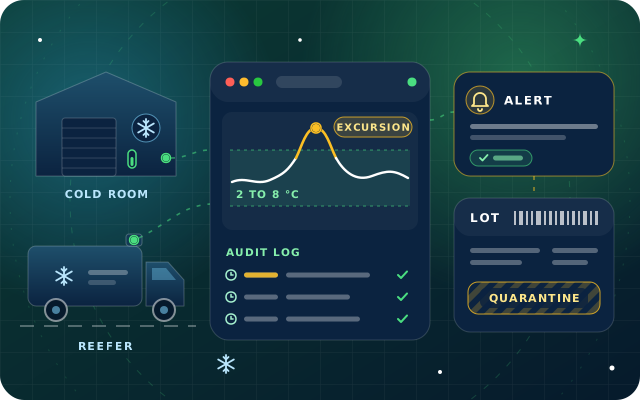
Cold chain monitoring matters most in a UAE summer, when every open door and struggling compressor counts. This guide covers sensors for cold rooms and vehicles, escalating alerts, audit trails, calibration and linking excursions to batches.
Summer heat, frequent door openings on multi-drop routes and waits on loading docks make excursions more likely, so monitoring must be continuous.
Place cold room sensors where mapping shows the hot and cold spots, and give vehicles air probes, buffered probes, door sensors and location.
Alerts need delays, severity levels and an escalation chain, so a short door opening wakes nobody but a failing compressor does.
Records must be tamper-evident and sensors calibrated against a traceable reference, or the data will not stand up to an inspector.
Linking each excursion to the lots and batches held in that place at that time turns an alarm into a quarantine and release decision.
A cold room that holds its setpoint all winter can struggle on a humid summer afternoon, when the loading-bay door has been open for a delivery and the compressor is already working at its limit. For food and pharmaceutical distributors in the UAE, those are the hours when product quality is won or lost, and often nobody is watching.
Cold chain monitoring replaces the clipboard and the occasional data-logger download with continuous measurement, alerts that reach the right person and records that prove what happened. This guide covers what to monitor, how to alert without crying wolf, how to keep the data trustworthy and how to link a temperature excursion to the exact lots and batches it affected.
Why the UAE Summer Raises the Stakes for Cold Chain Monitoring
The UAE has a desert climate with hot, humid summers, as the government's own fact sheet puts it, and every link in the cold chain feels that heat.
Heat load. Refrigeration units run closer to their limits, so a small fault, such as a dirty condenser or a failing fan, shows up as a temperature rise much sooner.
Door openings. Multi-drop delivery routes open the vehicle door many times a day, and each opening lets warm, humid air into the load space.
Loading docks. Pallets waiting on an unrefrigerated dock warm up faster than staff expect, especially when a vehicle is late.
Unnoticed failures. A tripped compressor or a power cut at night can go unseen until the morning shift opens the door.
Condensation. Moving cold products into warm, humid air wets cartons and labels, which matters for both food and medicines.
None of this is new to experienced operators. What monitoring changes is that problems are seen while they can still be fixed, and that you can prove afterwards what happened.
What to Monitor in Cold Rooms, Vehicles and Fridges
Cold Rooms and Warehouses
A single sensor beside the evaporator tells you how the cooling unit is doing, not how the product is. Temperature mapping, a study that places data loggers throughout the room, both empty and fully loaded, finds the hot and cold spots and shows where permanent sensors belong. The World Health Organization's technical supplements on storing and transporting temperature-sensitive pharmaceutical products include guidance on temperature mapping, monitoring systems, accuracy checks and refrigerated vehicles, and they make useful reading for food businesses too.
Add door sensors, humidity sensors where products need them and a signal for power or compressor status, so that an alarm explains itself.
Refrigerated Vehicles
In trucks and vans, combine an air temperature probe in the load space with a door sensor and the vehicle's location. A probe in a buffered medium, such as a small bottle of glycol, follows product temperature more closely than air and smooths out the brief spike of a door opening.
Location turns an excursion into a story: where the vehicle was, how long the door stayed open and which customer's drop was under way.
Pharmacy and Clinic Fridges
Medicines labeled for refrigerated storage are commonly kept between 2 and 8 °C. Fridges in pharmacies, clinics and hospital wards need continuous logging, an alarm that reaches someone after hours and a record showing that the fridge stayed in range overnight and over the weekend.
Location
What to measure
Common causes of excursions
Cold room
Air temperature at mapped hot and cold spots, door status, humidity where needed
Doors held open, overloading, defrost cycles, compressor faults
Reefer truck or van
Load-space temperature, a buffered product probe, door status, location, unit status
Frequent door openings, skipped pre-cooling, unit switched off
Pharmacy or clinic fridge
Buffered probe temperature, door status, power
Power cuts, doors left ajar, overfilled shelves
Loading dock
Ambient temperature, time goods spend outside the cold room
Late vehicles, long waits between cold room and vehicle
Alerting and Escalation That People Act on
Cold chain monitoring fails quietly when alerts are ignored. The aim is fewer, better alerts, each with a clear owner and a clear next step.
Set limits from the product, not the equipment. Use the storage range on the label or the product specification, with an inner warning band so people act before the limit is reached.
Add delays. Loading raises air temperature for a few minutes. Alert when an excursion lasts long enough to matter, or when the buffered probe starts to move.
Use severity levels. A warning goes to the shift lead, while a critical alert goes to the on-call manager and to quality assurance.
Escalate when nobody responds. If the first contact does not acknowledge within the agreed time, the alert moves to the next person automatically.
Alert on silence. A sensor that stops reporting, or a gateway that loses its link, deserves an alert of its own.
Record the response. The acknowledgment, the action taken and the time the condition cleared all become part of the record.
Tip: write the escalation chain on paper before you configure it. Who gets the call at 2 am on a Friday, and who decides whether stock is quarantined? If those answers are unclear, the alerts will be too.
Have a question about this guide? Ask the engineers who wrote it.
An inspector, an auditor or a customer's quality team will ask two questions: what happened, and can you show the record has not been changed? Good monitoring answers both.
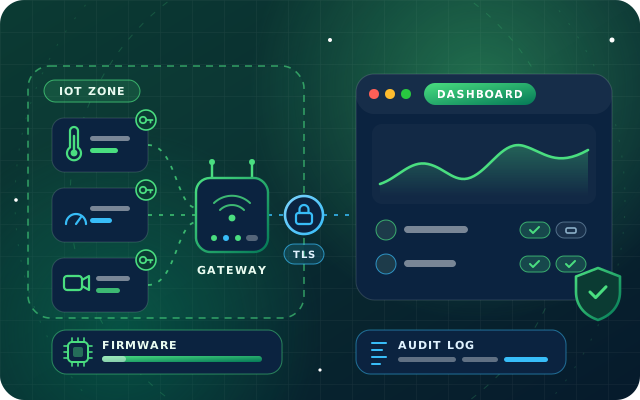
Readings carry a timestamp from a synchronized clock, and users cannot edit or delete them.
Gaps stay visible: if a sensor goes offline, the record shows the gap rather than joining the dots.
Gateways buffer readings when the network drops and upload them when it returns, so a short outage does not create a gap.
Every acknowledgment, comment, rule change and threshold edit is logged with the user, the time and the previous value.
Reports per room, vehicle or shipment export cleanly for customers and inspectors.
Requirements differ by product, license and emirate, so confirm with the food safety or health authority that licenses you which records they expect and how long you must keep them. Then make sure your backups cover the whole period.
Calibration: Trust the Numbers before You Act on Them
A sensor that reads one degree warm causes false alarms. One that reads one degree cold hides real ones. Calibration keeps both problems in check.
Buy sensors that come with a calibration certificate traceable to national or international standards.
Check accuracy against a reference instrument at a defined interval, and again after a repair or physical damage.
Keep each certificate and check result with the device record, so the evidence sits next to the readings.
When a sensor drifts outside tolerance, replace or recalibrate it and review the data it recorded since its last good check.
Repeat temperature mapping after major changes, such as new racking or a new cooling unit, and consider mapping during the hottest months, when the room is under most strain.
Linking Excursions to Lots and Batches in the ERP
Many cold chain setups stop at the alarm. The real question comes next: which products were affected? Answering it needs the monitoring platform and the ERP to share two facts, where the stock was and when. Here is how a connected setup handles an excursion, step by step:
Record the excursion. The platform logs the location or vehicle, the start and end times and the peak temperature.
Find the stock. The ERP lists the lots and batches held in that location, or loaded on that vehicle, during that window, using its stock moves and delivery records.
Quarantine it. Affected stock moves to a quarantine location or is blocked, so it cannot be picked or sold.
Decide. Quality assurance reviews the excursion against the product's stability information or the supplier's guidance, then releases the stock, returns it to the supplier or disposes of it.
Trace onwards. The decision is recorded on the lot with the excursion report attached, and any units already delivered are traced to the customers who received them.
Fix the cause. Write-offs and claims post to the right accounts, and the root cause, such as a door left open or a failing unit, becomes a corrective action or a maintenance work order.
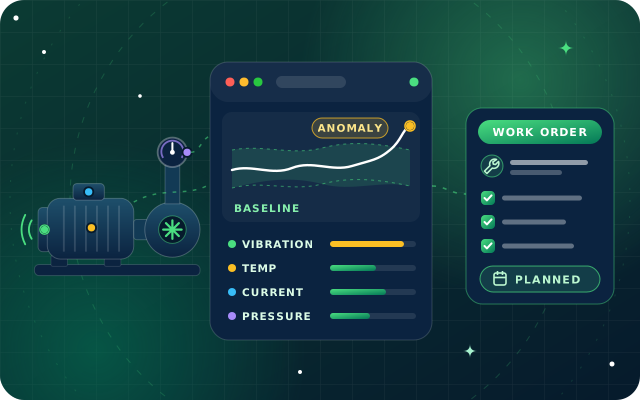
This only works if the ERP tracks lots, batches and locations precisely. Batch and expiry tracking, with traceability from supplier to customer, is the foundation, and sensors add the time and temperature dimension. Refrigeration units themselves can be watched with the same sensors used for predictive maintenance, so a failing compressor is serviced before it causes an excursion.
How Star Bit Solutions Can Help
StarSense, our AI and IoT platform, monitors cold rooms, medicine fridges, trucks and containers with temperature and door sensors, raises location-linked excursion alerts and produces shipment reports that show customers the cold chain held. Alerts go out by email, in-app notification and WhatsApp through StarBot, with severity levels, escalation and acknowledgment tracking, and every configuration change and acknowledgment lands in an audit log.
On the ERP side, StarBiz, our AI-driven ERP, tracks lots, serials and expiry dates per warehouse and location, with traceability reports that show where each batch went. StarSense connects natively to StarBiz for maintenance work orders, so a failing refrigeration unit becomes a planned job. Its REST API and webhooks can pass excursion data to StarBiz or another ERP, so the batch review starts from the stock records rather than a spreadsheet. Distributors can see how we approach multi-warehouse stock and fleet sensors on our logistics industry page, and pharmacies and clinics can read about batch and expiry control on our healthcare industry page.
Not sure which sensors or gateways your site needs? Send us a floor plan or a photo of your cold room through the contact page, call +971 55 973 4524 or email [email protected]. We will review it in a free consultation and propose a pilot with a clear hardware list before any commitment.
Written by the Star Bit Solutions team
Star Bit Solutions is a software company in Ajman, UAE, founded in 2014. We implement and customize Odoo Enterprise and Odoo Community, and build StarBiz (AI-driven ERP), StarHub (life super app), StarBot (conversational AI), StarLearn (adaptive learning) and StarSense (AI and IoT platform). About us
Maintenance strategies compared, the sensors that matter, baselines and anomaly detection in plain terms, alert thresholds and the loop to work orders.
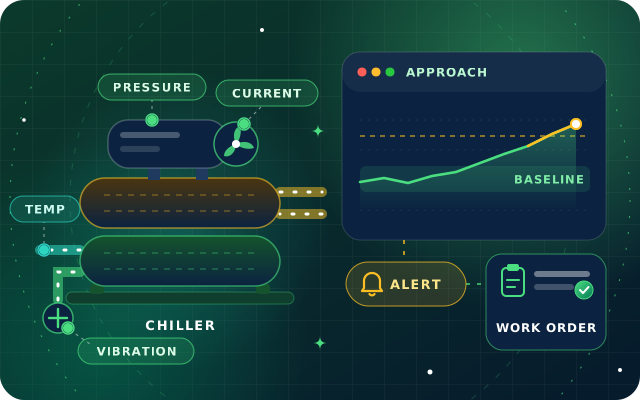
Sensor points, chiller fault patterns, alert routing and maintenance schedules: a practical guide to predictive maintenance for cooling plant in UAE buildings.
Cold chain monitoring is the continuous measurement of temperature, and sometimes humidity, door status and location, wherever temperature-sensitive products are stored or moved. Sensors in cold rooms, fridges and vehicles send readings to a platform that raises alerts when limits are breached and keeps a time-stamped record. The aim is to catch problems while they can be fixed and to prove afterwards that products stayed in range.
What temperature should a pharmaceutical fridge be kept at?
Follow the storage conditions on each product's label or specification. For many medicines labeled for refrigerated storage, that means 2 to 8 °C. Set alarm limits inside that range so staff can act before the limit is reached, use a buffered probe to reflect product temperature, and check current requirements with the health authority that licenses your pharmacy or clinic.
How often should cold chain sensors be calibrated?
There is no single interval for every device. Set one in your quality procedures, based on the manufacturer's guidance and any requirements from your customers or regulator, and check sooner after repairs, physical damage or a reading that looks wrong. Keep each certificate with the device record, and review the data a sensor recorded since its last good check if it fails.
Does cold chain monitoring work on routes with poor mobile coverage?
Yes, if the devices buffer their readings. Loggers and gateways store data while the connection is down and upload it when coverage returns, so the record stays complete. Real-time alerts do need a connection, so on routes with known black spots, combine buffering with door sensors, pre-trip checks and a review of each trip's data at the end of the route.
What is a temperature excursion?
A temperature excursion is any period when a product is outside its permitted storage range. Whether it matters depends on how far the temperature went, for how long and what the product's stability data or the supplier's guidance allows. That is why an excursion record needs the start and end times, the peak value and the lots or batches that were in that location.
StarSense by Star Bit Solutions
Know Your Cold Chain Held, Hour by Hour.
Book a free site survey. We will look at your cold rooms, vehicles and fridges and propose a pilot with a sensor list, alert rules and the reports you would see.