Learning Analytics for Teachers: Turning Quiz Data into Next Steps
Star Bit Solutions10 min read
Learning analytics should help a teacher decide what to do on Monday morning, not add another report. Here are the quiz signals worth watching, how dashboards should lead to action, which interventions to try and how to protect young learners' privacy.
Useful learning analytics start from objectives: mastery by objective, common misconceptions and practice patterns, not logins or time online.
Every dashboard panel should end in a decision: reteach, regroup, practice, stretch or check in with a learner.
Record each intervention and check the next quiz on that objective, so you learn which actions actually close gaps.
With young learners, collect only what teaching needs, limit who sees it and never let a flag become a label.
Most teachers already have more data than time. Every online quiz produces scores, attempts and timings, and many platforms turn them into charts. Yet the question that matters on Monday morning is simple: which learners need me this week, and on what? If a dashboard cannot answer that in a few minutes, it is decoration.
This guide treats learning analytics for teachers as a practical craft rather than a statistics exercise. It starts from the quiz data you already collect and ends with what you do in the next lesson, with a firm line between supporting learners and watching them.
What Learning Analytics Means in a Classroom
The definition most often quoted in the field dates from the first Learning Analytics and Knowledge conference in 2011. It describes learning analytics as measuring, collecting, analyzing and reporting data about learners and their contexts, in order to understand and improve learning and the settings in which it happens. The final part is the one that counts. Analytics that do not change what happens next for a learner are just reporting.
In a school it helps to separate two uses. Leadership needs aggregate views: how a year group is progressing, which units cause trouble and where to invest in training. Teachers need close-up, short-cycle views that feed formative assessment, the everyday practice of checking understanding and adjusting teaching in response. This article focuses on the second.
The Quiz Signals That Matter
A single percentage hides most of what a quiz can tell you. Three kinds of signal are worth more.
Mastery by Objective
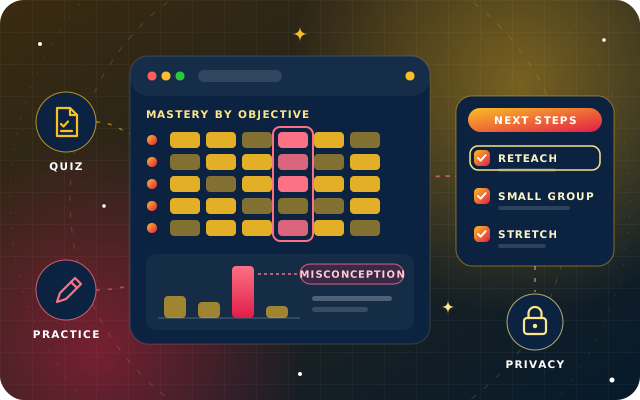
Tag every question to the learning objective or skill it tests, and the same quiz becomes a map. A class average can look healthy while one objective is weak for a large part of the room. Mastery by objective shows where to aim, and a heatmap with learners down one side and objectives across the top makes the pattern visible in seconds.
Common Misconceptions
Wrong answers are not all equal. In a well-written multiple-choice question, each wrong option reflects a specific misunderstanding, so the pattern of choices shows what learners think, not just that they are wrong. When many learners pick the same wrong option, you have found a misconception worth reteaching to the whole class. When wrong answers are scattered, the cause is more likely to be individual gaps or a confusing question.
Practice Patterns
How learners practice matters as much as their scores. Useful signals include repeated attempts at the same item, hints requested before answering, very fast answers that suggest guessing, long gaps since a learner last practiced, and skills that were secure but are slipping in review. Together they separate a learner who is struggling from one who is rushing, and both from one who has stopped engaging.
Some signals look precise but mislead. Time logged in, clicks and pages viewed are easy to count and say little about learning. Treat them as context at most, never as a measure of effort or ability.
Dashboards That Lead to an Action
A good teacher dashboard is designed backwards from decisions. Before adding a chart, ask what a teacher would do differently because of it. If the answer is nothing, leave it out. Four design rules help:
Start from objectives, not rankings. Show which skills need work and who shares each gap, rather than a league table of learners.
Show how sure the data is. Mastery estimated from two questions is a hint, not a verdict, so mark estimates that rest on little evidence.
Highlight change. A learner who was secure and is now slipping matters more this week than one who has been steady all term.
Put the action next to the signal. Assigning practice, forming a group or noting a conversation should be one step from the chart.
Signal
What it may mean
A sensible next step
Many learners choose the same wrong answer
A shared misconception
Reteach the idea with a new example, then check with a fresh question
One objective is weak across the class
That lesson did not land
Revisit it next lesson and add practice for that objective
A few learners are weak on a prerequisite
Gaps from an earlier unit
A short small-group session on the prerequisite
Fast, wrong answers
Guessing or rushing
A quiet word about strategy, and ask the learner to explain one answer
Many hints and slow progress
Real difficulty with the skill
Worked examples and guided practice, with a check-in
No activity for several days
Disengagement, or something outside school
A personal check-in before any academic response
Secure on everything and finishing early
Ready for more
Stretch tasks or a harder problem set
Have a question about this guide? Ask the engineers who wrote it.
Worked Example: From Friday's Quiz to Monday's Plan
Imagine a lower secondary science class that takes a short online quiz on forces at the end of the week. Here is how its teacher turns the results into a plan in a few minutes.
Scan the objective heatmap. Most objectives look secure, but the one on balanced forces and constant speed is weak for much of the class.
Check the wrong answers. On the key question, most wrong answers chose the same option: that a moving object needs a constant force to keep moving. That is a classic misconception, not a set of random slips.
Plan a whole-class reteach. Monday's lesson opens with a short demonstration and discussion, then one new question that only someone who understands the idea will answer correctly.
Form a small group. A handful of learners are weak on an earlier objective about drawing force arrows, so they get a short session while the class practices.
Read the practice patterns. One learner answered every question in seconds and got most wrong, so the teacher plans a quiet conversation about approach. Another has not logged in for a week, which calls for a pastoral check-in first.
Stretch those who are ahead. Learners secure on every objective get a harder problem set that brings in friction.
Record and review. Each action is noted against the learners concerned, and next week's quiz shows whether the misconception has shifted.
Nothing in that plan needs advanced statistics. It needs questions tagged to objectives, wrong answers that mean something and a view that puts both in front of the teacher at once.
Interventions That Close Gaps
Analytics only matter if they change what happens next. Most responses fall into a few families:
Whole-class reteaching when a misconception is widespread, with a new explanation or example rather than the same one again, more slowly.
Small-group sessions for learners who share a specific gap, often a prerequisite from an earlier unit.
Targeted practice assigned by objective, so each learner works on their own gap instead of a generic worksheet.
One-to-one conversations when patterns suggest guessing, anxiety or disengagement, where the cause matters more than the score.
Stretch and challenge for learners who are secure, so analytics serve the confident as well as the struggling.
Close the loop every time. Note what you did and for whom, then look at the next quiz on that objective. Over a term, those notes become your own evidence of which interventions work for your learners, and they help colleagues who teach the same unit next year.
Privacy for Young Learners
Learning data about children deserves particular care. It can shape how adults see a child, it can follow them from class to class and year to year, and children cannot easily weigh up what they are sharing. These principles keep analytics on the right side of the line:
Collect what teaching needs. Answers, attempts, hints and progress are enough to support learning. Location, contacts, webcam images and keystroke logs are not needed.
Limit who sees what. A teacher sees their own classes, a parent sees their own child, and leadership works from aggregate trends unless there is a reason to look closer.
Set retention rules. Decide how long detailed learning data is kept, and delete it when it no longer serves the learner.
Be transparent. Tell learners and parents in plain language what is collected, why and who can see it.
Keep a person in the decision. Flags prompt a teacher to look. They never decide a learner's group, grade or future on their own.
In the UAE, the Personal Data Protection Law, Federal Decree-Law No. 45 of 2021, came into force on 2 January 2022. As the UAE government portal summarizes, it prohibits processing personal data without the owner's consent except in limited cases. It does not cover government entities or free zones that have their own data protection laws, so which rules apply depends on who runs the school and where.
The Child Digital Safety law, Federal Decree-Law No. 26 of 2025, came into force on 1 January 2026, with a one-year period for platforms to comply. Among other things, it bars digital platforms from processing the personal data of children under 13 without explicit, verifiable parental consent, and from using it for commercial purposes or targeted advertising. Platforms used for educational or health purposes can be exempted from that rule by Cabinet decision, with safeguards, so check the latest guidance with your education regulator and legal adviser. This section is general information, not legal advice.
Support, Not Surveillance
The same data can support a learner or watch them. The difference lies in purpose, proportion and who benefits. Before you switch on a new report, run it past these tests:
It helps the learner, or the teacher teaching them, rather than simply monitoring.
Learners and parents would not be surprised to learn that it exists.
It uses learning activity, not personal life or behavior outside lessons.
It does not rank children publicly or attach labels that follow them.
A teacher reviews every flag before anything happens as a result.
There is a simple way to correct data that is wrong.
Established frameworks say much the same. The code of practice for learning analytics from Jisc, the UK's digital, data and technology agency for tertiary education and research, was first published in 2015. It covers responsibility, transparency and consent, privacy, validity, access, enabling positive interventions, minimizing adverse impacts and stewardship of data. It was written for colleges and universities, but it works as a checklist for schools too.
Tip: Write a one-page note for parents that lists what your learning platform records, who can see it and how long it is kept. If any line is hard to write, or would surprise a parent, change the setting before you change the wording.
How Star Bit Solutions Can Help
StarLearn, our adaptive learning platform, is built around the loop described here. Every question carries a skill tag, so results are scored per skill rather than as a single grade, and educators see cohort progress, mastery per skill and a skill heatmap per learner and per cohort as learners work. At-risk flags highlight inactivity, low mastery or repeated errors, a drill-down shows each learner's attempt history and time on task, and intervention notes and follow-up tasks are recorded per learner, feeding back into the learner profile.
Privacy is a default rather than an add-on. Access is role-based, so a teacher sees their classes and a parent sees their own child, institutions decide what learners can see, share and message, and retention and deletion follow the policy the school defines. Our privacy policy explains how we process learner information on a school's behalf. If adaptive learning is new to your team, start with our guide to how adaptive learning works, and see how we support schools on our education industry page.
To see your own quiz data turned into next steps, contact us or call +971 55 973 4524. Send us a sample quiz and we will build a short demo around it.
Written by the Star Bit Solutions team
Star Bit Solutions is a software company in Ajman, UAE, founded in 2014. We implement and customize Odoo Enterprise and Odoo Community, and build StarBiz (AI-driven ERP), StarHub (life super app), StarBot (conversational AI), StarLearn (adaptive learning) and StarSense (AI and IoT platform). About us
Role-based onboarding paths, diagnostics that skip what staff already know, spaced compliance refreshers, microlearning and dashboards that show competence.
A plain-language guide to adaptive learning: mastery estimates, diagnostics and spaced practice, the data behind them, the teacher's role and the pitfalls to avoid.
The definition most quoted, from the first Learning Analytics and Knowledge conference in 2011, describes it as the measurement, collection, analysis and reporting of data about learners and their contexts, to understand and improve learning. In a classroom it usually means turning quiz, practice and assignment data into a clear view of which learners need help, and on which objectives, so the teacher can decide what to do next.
Which quiz data should teachers look at first?
Start with mastery by objective: which learning objectives a class has secured and which it has not. Then look at the pattern of wrong answers on the weak objectives, because a shared wrong answer often reveals a misconception. Finally, check practice patterns such as repeated attempts, heavy hint use, very fast answers and inactivity to find learners who need a conversation.
How can teachers use quiz data without extra workload?
Tag questions to objectives once, and let the platform mark routine quizzes and build the objective view automatically. Then spend a few minutes each week on three questions: which objective needs reteaching, which learners share a gap and who needs a check-in. Record the action in the same place, and the next quiz shows whether it worked.
Is it safe to collect learning data about children?
It can be, with the right limits. Collect only what teaching needs, such as answers, attempts and progress, restrict access by role so teachers see their classes and parents their own child, set retention rules, explain clearly what is collected and keep teachers in every decision. In the UAE, check how the Personal Data Protection Law and the Child Digital Safety law apply to your school.
What is the difference between learning analytics and surveillance?
Purpose and proportion. Learning analytics uses learning activity to help a learner or their teacher decide what to do next, and learners would not be surprised that it exists. Surveillance monitors behavior for its own sake, collects more than teaching needs or is used to rank and label children. A useful test is whether every report leads to support.
StarLearn by Star Bit Solutions
Turn Friday's Quiz into Monday's Plan.
Send us a sample quiz. We will show you the StarLearn teacher view built around it, from the skill heatmap to the next steps.