UAE E-Invoicing Readiness: A 2026 Checklist for Your ERP
Star Bit Solutions10 min read
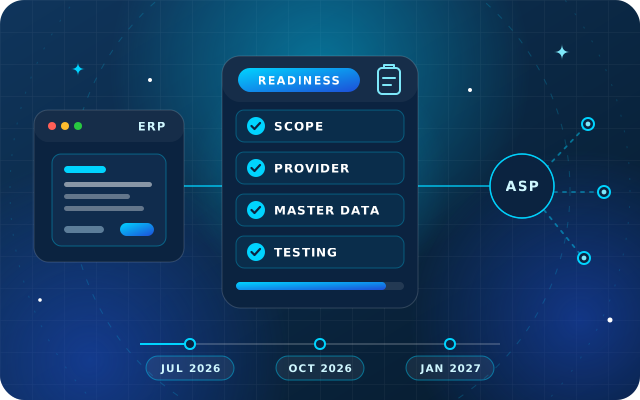
The pilot starts on 1 July 2026, and businesses with revenue of AED 50 million or more now have until 30 October to appoint a provider. This UAE e-invoicing readiness checklist covers provider choice, master data, invoice fields, testing, controls and the questions to put to your ERP partner.
Businesses with revenue of AED 50 million or more now have until 30 October 2026 to appoint a provider, but must still go live on 1 January 2027.
The pilot and voluntary adoption start on 1 July 2026, and the e-invoicing penalties do not apply to e-invoices exchanged voluntarily.
Readiness is mostly data: legal names, TRNs, trade license details, units of measure and tax categories decide whether invoices pass.
Test real cases, including credit notes, exports, free zone supplies, rejections and buyers who have not yet onboarded.
Give rejections and outages an owner: e-invoices are due within 14 days, and system failures must be reported within two business days.
Eight months ago, UAE e-invoicing was two Ministerial Decisions and a timetable. Since then, guidelines, mandatory invoice fields and fines have followed, and in May the first deadline moved. With the pilot program due to start on 1 July 2026, now is the right time for a UAE e-invoicing readiness check on the system that produces your invoices: your ERP.
This checklist is for finance and IT leads in businesses that invoice other businesses or the government. It follows the order the work usually takes: confirm your phase, choose a provider, clean your data, map the fields, test, and put controls around the new flow.
Not tax or legal advice: this article reflects the decisions and guidance published by the Ministry of Finance up to early June 2026. The rules are still being refined, so check the latest guidance from the Ministry and the Federal Tax Authority (FTA), and confirm your position with a registered tax agent.
Where UAE E-Invoicing Stands in June 2026
Ministerial Decisions No. 243 and No. 244 of 2025 set the scope and the timetable, and Cabinet Decision No. 106 of 2025 added the penalties in December. In late February 2026 the Ministry published its Electronic Invoicing Guidelines, the mandatory fields and a note on selecting a provider.
Then on 10 May 2026 the Ministry announced targeted amendments. Ministerial Decision No. 66 of 2026 gives businesses with revenue of AED 50 million or more until 30 October 2026, instead of 31 July, to appoint an accredited service provider (ASP). Their go-live date did not move.
Who
Appoint an ASP by
Implement e-invoicing by
Businesses with revenue of AED 50 million or more
30 October 2026
1 January 2027
Businesses with revenue below AED 50 million
31 March 2027
1 July 2027
Government entities
31 March 2027
1 October 2027
Revenue means gross income in your latest accounting period, per your financial statements. The pilot runs with taxpayers the Ministry invites, and anyone may start voluntarily from 1 July 2026. The fines do not apply to voluntary e-invoices, so an early start is a low-risk way to learn.
Step 1: Confirm Your Phase and Your Scope
Which phase are you in? Check revenue in your latest financial statements against the AED 50 million line, and decide early if you are close to it.
Which transactions are in scope? Business-to-business and business-to-government transactions, whatever your VAT status. Sales to consumers stay out until a later decision, and a few transactions are excluded, such as certain airline services and Financial Services that are exempt or zero-rated for VAT.
Do you have a Tax Identification Number (TIN)? Your e-invoicing address is built from your TIN, the first 10 digits of your Tax Registration Number (TRN). A business in scope that is not required to register for any tax must still register with the FTA to obtain one.
Are you in a VAT group? Each member onboards separately with its own TIN, and the guidelines give a 24-month grace period from 1 January 2027 for transactions between members of the same VAT group.
Step 2: Choose an Accredited Service Provider
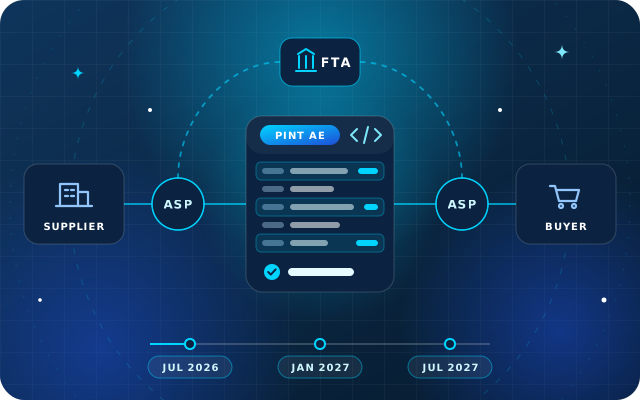
Under the UAE's five-corner model, your ERP does not talk to the FTA directly. Invoice data goes to your ASP, which validates it, delivers it over the Peppol network to the buyer's ASP and reports the tax data to the FTA. Peppol is the international framework for exchanging business documents, and PINT AE is the UAE version of its invoice specification.
You need one ASP for both sending and receiving. The Ministry lists approved providers on its e-invoicing page; on 10 May it reported 32, with more in the final stages of accreditation. Once you have signed, you start onboarding through EmaraTax, and the ASP gives you your Peppol participant identifier. Questions for each candidate:
Integration: is there an API, file exchange or a ready connector for your ERP, and in which formats?
Operation: Ministerial Decision No. 56 of 2026 lets an ASP use a third-party platform while remaining fully responsible, so ask who runs it and who answers support calls.
Service levels: what uptime and response times are in the contract?
Data: where is it stored, how is it secured, and how will you retrieve it for the FTA throughout the retention period?
Price: subscription or per document, what costs extra, and does the contract include the 100 free e-invoice exchanges a year that Decision No. 64 of 2025 requires providers to commit to?
Incoming invoices: will supplier e-invoices reach payables as data you can match, or as documents someone re-keys?
Have a question about this guide? Ask the engineers who wrote it.
Step 3: Clean the Master Data Your Invoices Draw on
An e-invoice is assembled from master data, so every gap in a customer, product or tax record becomes a rejected or incorrect invoice. Clean these records before you build any integration:
Customers and suppliers: legal name as registered, TRN or TIN, trade license number and issuing authority, full address including the emirate and, once known, the buyer's Peppol participant identifier.
Products and services: a clear name and description, a unit of measure that maps to a standard code and a tax category on every item.
Tax codes: standard-rated, zero-rated, exempt, out of scope, domestic reverse charge and margin scheme, each mapped to its e-invoicing tax category.
Payment terms: a due date and a payment means on every invoice.
Duplicates: merge duplicate customers and suppliers, so one TRN means one record.
Step 4: Map the Mandatory Fields and Transaction Types
The Ministry's mandatory fields document lists 51 fields for an electronic tax invoice and 49 for a commercial invoice, the term for an invoice that is not a tax invoice, such as one for an exempt supply. They fall into six groups, and the job is to find where each one lives in your ERP.
Field group
Examples
Usually comes from
Invoice details
Number, issue date, type code, currency, transaction type flags, due date, payment means
Invoice header and payment terms
Seller details
Legal name, TRN, electronic address, legal registration number and type, address
Company settings
Buyer details
Legal name, TRN, electronic address, address
Customer record
Document totals
Net total, tax total, total with tax, amount due
Calculated on the invoice
Tax breakdown
Taxable amount and tax for each tax category and rate
Tax engine
Invoice lines
Quantity, unit of measure code, net and gross price, item name and description, VAT and line amount in AED
Product record and order line
The transaction type code is a set of eight flags: free zone, deemed supply, margin scheme, summary invoice, continuous supply, disclosed agent billing, e-commerce supply and export. Decide which sales trigger each flag and how the ERP will know, for example from the customer's location or the order type.
Two details catch people out. Foreign-currency invoices must also show the VAT and amounts payable in AED. And every credit note needs a reference to the invoice it corrects; one credit note may refer to several invoices, or cover only part of one.
Step 5: Test the Whole Flow before You Go Live
The guidelines ask businesses to test the full cycle with their ASP: sending data, delivery to the buyer, confirmation messages, receiving supplier e-invoices and reporting to the FTA. Build the test pack from real transactions:
a standard-rated tax invoice to a VAT-registered customer;
a foreign-currency invoice with its AED amounts;
a partial credit note against an earlier invoice;
a mixed invoice with standard-rated and zero-rated lines;
an export, and a supply to or from a free zone;
an invoice to a buyer not yet onboarded, using the predefined fallback address in the guidelines, plus the normal tax invoice that buyer still needs;
a deliberately broken invoice, to see how rejections come back and who sees them;
an incoming supplier e-invoice matched to its purchase order and goods receipt.
Step 6: Put Internal Controls around the New Flow
A status for every invoice. Show whether each invoice was delivered, rejected or reported, and reconcile statuses with posted invoices daily.
An owner for rejections. Route each rejection to a named person with a target time, because an e-invoice must be issued and sent within 14 days of the transaction, or of payment if that comes first.
No edits after sending. Correct a sent invoice with a credit note and, if needed, a new invoice.
An outage procedure. Report a system failure to the FTA within two business days, and send held invoices once service resumes.
Change notifications. Tell your ASP in writing within five business days after the FTA confirms a change to your registered details.
Retention and access. Keep e-invoices, credit notes and their data for the statutory period, retrievable on request, and limit who can change tax codes and master data.
The penalties show why. Under Cabinet Decision No. 106 of 2025, a late implementation or ASP appointment costs AED 5,000 for each month or part of a month, a late e-invoice or credit note AED 100 each, capped at AED 5,000 a calendar month, and late notice of a system failure or a registration change AED 1,000 a day.
UAE E-Invoicing Readiness Questions for Your ERP Partner
How will invoice data reach our ASP: a connector, an API integration or a file export, and who maintains it?
Which mandatory fields do we already hold, and which need new fields or configuration?
How will the system set the transaction type flags and map our tax codes?
Where will we see delivery, rejection and reporting statuses, and can a rejection create a task for a named user?
How will incoming supplier e-invoices be loaded and matched to purchase orders?
What happens to the integration when the ERP or the specification is upgraded?
On Odoo, state your exact version and edition. At the time of writing, Odoo's UAE localization documentation covers UAE taxes and the VAT return but does not describe a UAE e-invoicing flow, so plan the ASP connection as a project of its own. Our article on what the 2025 Ministerial Decisions mean for your ERP covers the background.
A Worked Example: A Distributor's Plan to January 2027
Take a distributor with revenue of AED 80 million that invoices from its ERP and receives most supplier bills as PDFs. Working back from its deadlines:
June: confirm scope and transaction types, start the master data clean-up and send questions to three or four ASPs.
July and August: compare proposals, check each provider's status on the Ministry's list, agree the integration approach with the ERP partner and sign.
September: onboard through EmaraTax, receive the Peppol participant identifier and build the integration.
By 30 October: the ASP appointment is complete and documented.
November: run the test pack, fix mappings and train sales, receivables and payables.
December: rehearse the cut-over, consider exchanging live e-invoices voluntarily with a few willing partners, and freeze tax code changes.
1 January 2027: go live, with a daily status reconciliation for the first weeks.
A business below AED 50 million can run the same plan about six months later, but an early data clean-up also improves its VAT returns. Our quarter-end VAT return workflow covers the tax codes and reconciliations e-invoicing relies on.
How Star Bit Solutions Can Help
Star Bit Solutions has built and implemented business software for UAE companies since 2014. For e-invoicing readiness, we can:
review invoice data, tax codes and credit note practice in StarBiz or Odoo Enterprise, and close the gaps against the mandatory fields;
map your sales to the transaction type flags and tax categories;
build the connection to the ASP you choose, through StarBiz's REST API and scheduled file exchange or an Odoo integration, and test it with your own transactions;
set up status monitoring, rejection queues and approval rules, and train your teams.
Tell us your revenue group and the systems you invoice from through the contact page, or call +971 55 973 4524, and we will outline a plan that meets your deadline.
Written by the Star Bit Solutions team
Star Bit Solutions is a software company in Ajman, UAE, founded in 2014. We implement and customize Odoo Enterprise and Odoo Community, and build StarBiz (AI-driven ERP), StarHub (life super app), StarBot (conversational AI), StarLearn (adaptive learning) and StarSense (AI and IoT platform). About us
When must UAE businesses appoint an e-invoicing service provider?
Under Ministerial Decision No. 244 of 2025, as amended by Decision No. 66 of 2026, businesses with revenue of AED 50 million or more must appoint an accredited service provider by 30 October 2026 and go live by 1 January 2027. Businesses below that line must appoint one by 31 March 2027 and go live by 1 July 2027, and government entities by 31 March 2027 and 1 October 2027.
Do I need a new ERP for UAE e-invoicing?
Usually not. Your ERP keeps creating invoices, and an accredited service provider validates and exchanges them over the Peppol network and reports the tax data to the FTA. What changes is the data: your system must hold every mandatory field, set the transaction type flags, send invoice data to the provider and track the statuses that come back. An integration and some configuration are normally enough.
What if my customer is not on e-invoicing yet?
Your obligation does not depend on your customer's status. Once you are live, you still issue the e-invoice through your provider, using the predefined fallback address set out in the Ministry's guidelines when the buyer has no Peppol identifier. The guidelines also require you to give that buyer a regular tax invoice, such as a PDF, until they implement e-invoicing.
What are the penalties for missing UAE e-invoicing deadlines?
Cabinet Decision No. 106 of 2025 sets AED 5,000 for each month or part of a month of delay in implementing e-invoicing, including a late provider appointment, and AED 100 for each e-invoice or credit note not sent on time, capped at AED 5,000 a month. Late notice of a system failure or of changed registration data costs AED 1,000 a day. Voluntary e-invoicing is outside these penalties.
How many fields does a UAE e-invoice need?
The mandatory fields document the Ministry of Finance published in February 2026 lists 51 fields for an electronic tax invoice and 49 for a commercial invoice. They cover invoice details, the seller, the buyer, document totals, the tax breakdown and the invoice lines. Some cases need further details, such as the original invoice reference on a credit note or AED totals on a foreign-currency invoice, so check the full PINT AE rules with your provider.
StarBiz by Star Bit Solutions
Be Ready for E-Invoicing before Your Provider Deadline.
We check your invoice data and tax codes in StarBiz or Odoo, plan the connection to your accredited service provider and test it with your own transactions.