The Challenge
The client sells tiles, sanitary ware, pipes, fittings, adhesives and tools from several branches to contractors, site engineers and walk-in customers. It already ran Odoo Enterprise for sales, inventory and accounting, but returns sat outside the system. Contractors bring back surplus material at the end of a job, order the wrong size of fitting or report breakage on delivery, so returns are a normal part of the trade rather than an exception.
At the counter, returns were handled by goodwill. Staff accepted goods back with a handwritten note, put them straight onto the shelf whether they were sound or damaged, and asked finance to raise a credit later. Credit notes were created as standalone documents, so they were hard to match to the invoice they related to, and exchanges were processed as a new sale with an informal discount. There was no approval step, and branch managers often learned about a large credit only when a customer queried a statement.
At the same time, counter staff spent much of the day answering calls and WhatsApp messages from contractors asking whether an order was ready or a delivery had left. The pain points were clear, and they are typical of Trading and Commerce:
- Returns accepted without a request, a reason or an approval
- Damaged goods put back into saleable stock, so system quantities could not be trusted
- Credit notes with no link to the original invoice, which confused customer statements
- Exchanges handled as informal new sales
- Order and delivery inquiries interrupting the counter all day
Our Approach
We ran discovery workshops with branch managers, counter staff, the warehouse team and finance, and mapped every way goods come back: site surplus, wrong item or size, damage in transit and exchanges for a different product. For each case we agreed who records the return, who inspects the goods, who approves and which document the customer receives. The client turned the result into a written returns policy before anything was configured.
The fit-gap review confirmed that standard Odoo Enterprise covers the process. Reverse transfers, Return for Exchange, credit notes created from the original invoice, Helpdesk after-sales actions and Studio approval rules needed configuration, not custom code. The only integration was StarBot, which connects to Odoo through OdooStar and works with the sales, inventory and helpdesk records it needs.
The phased plan kept risk low:
- Returns policy, return reasons and approvers agreed with management
- Returns operation types, locations, approval rules and Helpdesk after-sales actions configured on a test database and checked against real past returns
- A pilot at the branch with the most returns, then rollout to every branch
- StarBot launched on the website first, then on the business WhatsApp number
Training was role-based: counter staff learned to raise return requests, warehouse staff to receive and inspect, managers to approve from their activities and finance to issue and allocate credit notes. StarBot's knowledge base was built from the new policy and the questions branches answer most often, in Arabic and English.
The Solution
Two Steps before Stock or Money Moves
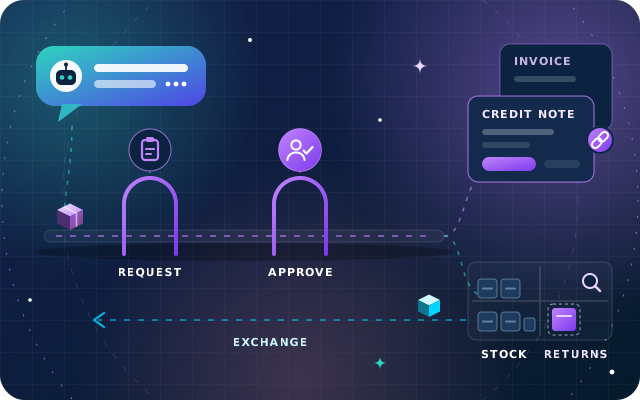
Every return now starts as a request. Counter staff, or StarBot on the customer's behalf, open a Helpdesk ticket linked to the customer's sales order, with the return reason recorded as a tag. Each branch works as its own Helpdesk team with the Returns and Refunds options enabled, so the Return button on the ticket creates the reverse transfer for the delivered items. That is step one.
Step two is approval. A Studio approval rule on the Validate button, limited by a condition to the returns receipts, means the branch manager must approve before the goods are accepted. When anyone else presses Validate, Odoo stops the action and creates an approval activity for the manager, and every approval is tracked in the record's chatter.
Stock Back in the Right Location
Each branch has a returns location, separate from saleable stock, and a returns operation type that sends goods there by default. Returned goods wait there for inspection. Sound items move back to stock with an internal transfer and damaged items are scrapped, so customer orders are only picked from goods that can actually be sold.
When a contractor needs the same item replaced, such as a cracked basin, Return for Exchange creates the return and the replacement delivery in one step. When the exchange is for a different size or product, the right item is added to the original sales order at its price-list price, which replaced the informal new sale with a discount.
Credit Notes Linked to the Original Invoice
Finance creates each credit note as a draft from the original invoice, or with the Refund button on the ticket, so it records its reason and the invoice it reverses. A second approval rule, on the credit note's Confirm button, asks a finance approver to sign off any credit note above an amount the client set. The credit is then allocated against open invoices or refunded, and statements show a clear pair of documents instead of an unexplained credit. The link to the original supply matters for VAT too, as our guide to refunds and UAE VAT credit notes explains. Helpdesk reporting groups return requests by tag and by team, so management sees returns by reason and by branch.
StarBot Answers Order Inquiries
StarBot runs on the website and the trader's business WhatsApp number. It answers order and delivery status questions from live Odoo records, explains the returns policy from the approved knowledge base and guides a customer through a return request, capturing the order reference, items, quantities and reason before opening a ticket for the right branch. Anything unusual is handed to branch staff in a shared team inbox with the full conversation attached.