Refunds and UAE VAT Credit Notes: Keeping Stock, Accounting and VAT in Step
Star Bit Solutions10 min read
A return is three transactions at once: goods come back, revenue and VAT reverse, and money moves. Here is what a UAE VAT credit note must show in August 2026, when to issue it, and how Odoo 19 keeps stock, accounting and VAT in step.
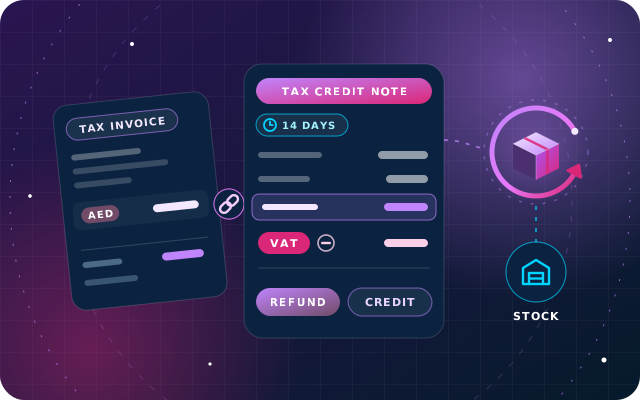
A UAE tax credit note is due within 14 days of the event that reduces the VAT due, such as a return, a later discount or a cancellation.
It must identify the original supply and show the invoiced value, the correct value, the difference and the VAT on it in AED.
Refund or credit on account, the credit note is what reduces output VAT; only the settlement of the balance differs.
E-invoicing pilots began in July 2026; businesses with revenue of AED 50 million or more must appoint a provider by 30 October 2026 and go live on 1 January 2027.
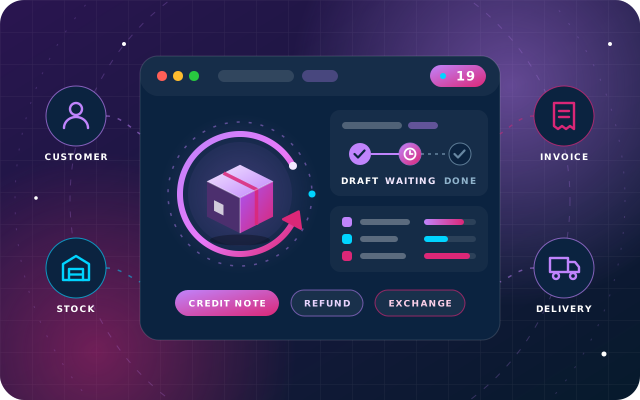
In Odoo 19, receive the return, then credit the original invoice, so stock, revenue and VAT reverse together and stay linked.
A customer return looks simple at the counter. Behind it sit three records that must agree: the goods coming back into stock, the revenue and VAT being reversed, and the money going back or staying on account. When one of them is late or wrong, the VAT return, the stock count or the customer's balance stops matching the others.
This guide explains what a UAE VAT credit note, called a tax credit note in the law, must contain as the rules stand in August 2026, when it must be issued, how refunds differ from store credit and how to run the flow in Odoo 19. It is a practical guide, not tax or legal advice: check the latest guidance from the Federal Tax Authority (FTA) or ask a tax adviser about your own case.
When UAE VAT Requires a Tax Credit Note
Article 61 of Federal Decree-Law No. 8 of 2017 on VAT, as amended, requires a VAT-registered supplier to adjust output tax after the date of supply when:
the supply is canceled;
the tax treatment changes because the nature of the supply changes;
the agreed consideration is altered for any reason, such as a later discount;
the customer returns goods, in full or in part, and the consideration is returned in full or in part;
tax was charged, or a tax treatment applied, in error.
Where the VAT charged is higher than it should have been, the supplier must issue a tax credit note within 14 days of the event (Article 62) and deliver it to the customer (Article 70). The VAT on the credit note reduces the supplier's output tax and, for a VAT-registered customer, reduces input tax for the tax period in which the credit note is received (Article 63). The FTA publishes the current texts on its legislation page.
What a UAE VAT Credit Note Must Show
Article 60 of the VAT Executive Regulation lists the particulars. A tax credit note must contain:
the words "Tax Credit Note", clearly displayed;
the supplier's name, address and Tax Registration Number (TRN);
the customer's name, address and TRN, where the customer is registered;
the date the credit note is issued;
the value of the supply shown on the tax invoice, the correct value, the difference between them and the VAT on that difference, in AED;
a brief explanation of why the credit note is issued;
enough information to identify the supply it relates to.
Two details catch businesses out. Amendments in force since 15 November 2024 clarify what happens when one invoice receives several credit notes: each later note starts from the value already adjusted by the previous one, as the FTA illustrates in its public clarification VATP040. And a credit note sent by electronic means, such as a PDF by email, is acceptable only if you can store it securely and guarantee its authenticity and integrity.
A Worked Example: Two Credit Notes on One Invoice
A distributor invoices a retailer for 10 units at AED 200 each: AED 2,000 plus 5% VAT of AED 100. The retailer returns 3 units, and a week later returns 1 more.
Particular
First credit note
Second credit note
Value of the supply on the tax invoice
AED 2,000
AED 1,400, as adjusted
Correct value of the supply
AED 1,400
AED 1,200
Difference
AED 600
AED 200
VAT on the difference at 5%
AED 30
AED 10
Total credited
AED 630
AED 210
Each credit note is issued within 14 days of its own return and refers to the original invoice. After both, the invoice nets to AED 1,200 plus AED 60 VAT, which is exactly what the customer kept.
Have a question about this guide? Ask the engineers who wrote it.
Refunds versus Store Credit: Same VAT, Different Settlement
Once the credit note exists, there are two ways to settle it, and the VAT effect is the same in both:
Refund: the money goes back by bank transfer, card or cash. In Odoo, register a payment on the credit note from the right bank or cash journal.
Credit on account: the balance stays on the customer's account and is set against the next invoice. In Odoo, the next invoice shows that the customer has outstanding credits, which you allocate to mark it paid.
Either way, it is the credit note that reduces output VAT, not the refund payment. Gift cards and vouchers sold as separate products are a different case with their own VAT rules, so check the latest FTA guidance before treating a voucher as a refund.
Keeping Stock, Accounting and VAT in Step in Odoo 19
Odoo 19, in both Enterprise and Community, handles a return after invoicing in four moves. Doing them in this order keeps the three records aligned:
Return the goods. From the sales order, open the delivery, click Return, adjust products and quantities, and validate the receipt when the goods arrive.
Credit the original invoice. Click Credit Note on the posted invoice, enter the reason and choose Reverse to edit a partial credit, or Reverse and Create Invoice to cancel the invoice and re-issue it.
Check and confirm. Match products and quantities to what came back, then confirm. Odoo records the original invoice number and your reason in the credit note's reference, which prints on the PDF.
Settle. Register the refund, or leave the credit outstanding for the next invoice.
With the UAE localization and the company's TRN recorded, credit notes print under the title Tax Credit Note, in English and, when enabled, Arabic, with a VAT amount column and company-currency amounts on foreign-currency documents. The standard layout shows the credited lines, the VAT and the reference, so check with your adviser how the invoice value, the correct value and the difference should appear, and extend the layout if needed.
Controlled Returns with SBS Auto Return
The standard flow works, but it relies on several people acting in the right order. SBS Auto Return, our free module built for Odoo 19, tested on Odoo 19 Community and listed for Odoo.sh and on-premise installations, puts the return, the credit note and the settlement on one record that a second person must approve:
Identified delivery return: each line takes its price, tax and maximum returnable quantity from the movement that shipped it, so the credit note matches the original sale.
Unidentified return: for customers without paperwork, record products, quantities and prices directly; the goods still come back through a real transfer backed by a posted credit note.
Exchange with new sale: the credit is netted against a replacement order, and only the difference is collected or refunded.
Nothing posts until a user with the manager role presses Finalize. Odoo then creates the transfer, the credit note, any new invoice and the payment together, and the amount can be split across cash and bank journals or left partly as credit on the customer's account. Optional bridge modules carry fixed or percentage discounts onto the credit note in proportion and let return lines use packing units, as our guide to returns with discounts and multiple units of measure explains. The full workflow is in sales returns, exchanges and refunds in Odoo 19.
E-Invoicing Changes How Credit Notes Travel
Under Ministerial Decision No. 243 of 2025, businesses in scope must issue electronic credit notes through an Accredited Service Provider (ASP) when a transaction is canceled, when the agreed consideration is reduced, when a refund is made in full or in part, or when an administrative or numerical error occurs. Electronic credit notes are also reported to the FTA.
The timetable announced by the Ministry of Finance began with a pilot on 1 July 2026. In May 2026 the Ministry extended the deadline for businesses with revenue of AED 50 million or more to appoint an ASP from 31 July to 30 October 2026, but they must still go live on 1 January 2027. Smaller businesses appoint one by 31 March 2027 and go live on 1 July 2027, and government entities go live on 1 October 2027. Sales to consumers fall outside e-invoicing, so their credit notes stay under the ordinary VAT rules.
Once you are live, the Executive Regulation sets aside the invoice-value, correct-value and difference format for electronic credit notes, and the data fields prescribed by the Ministry apply instead. The Ministry's guidelines also allow partial credit notes and a single credit note that refers to several earlier invoices. Our articles on what the 2025 Ministerial Decisions mean for your ERP and getting your ERP ready for e-invoicing cover the wider changes.
What changed on 1 January 2026: Federal Decree-Law No. 16 of 2025 removed the need for self-invoices under the reverse charge, allowed the FTA to deny input tax where a supply is part of a tax evasion arrangement, and set a five-year limit for reclaiming excess refundable tax. It did not rewrite the credit note rules above, but it makes linked, well-kept records even more valuable.
Reporting Credit Notes in the VAT Return
Credit notes reach the VAT return through the taxes on their lines. The FTA's VAT return guidance asks you to include reductions from credit notes issued in the sales figures, and credit notes received from suppliers in the expenses figures, for the period you are filing. In Odoo this happens automatically when each credit note uses the same tax as the original invoice, because the tax grids carry the amounts into the UAE VAT report.
Timing matters as much as mechanics. If a credit note is dated in a period whose tax return is already locked, Odoo 19 moves its tax into the next open period, and corrections to earlier returns follow the FTA's correction and voluntary disclosure rules. Our quarter-end VAT return workflow covers the review steps.
Credit Note Checklist for Finance and Warehouse Teams
Record the reason for every return, cancellation or price change when it happens.
Receive returned goods against the original delivery wherever possible.
Issue the tax credit note from the original invoice within 14 days of the event.
Check the credit note carries every particular in Article 60.
Use the same tax as the original invoice, so the VAT report picks it up.
For a second credit note on the same invoice, start from the adjusted value.
Decide between refund and credit on account, and record the settlement the same day.
Deliver the credit note to the customer and keep a secure copy.
Review open customer credits at every month end.
If you are in scope for e-invoicing, confirm your ASP can issue and report electronic credit notes.
How Star Bit Solutions Can Help
Through OdooStar, our Odoo practice, we implement and customize Odoo Enterprise, and Odoo Community where it fits, for UAE businesses. On Odoo 19 that includes the UAE localization, VAT taxes and tax grids, credit note layouts and the returns process that feeds them. For teams on Odoo.sh or their own servers that want a second signature on every refund, we set up SBS Auto Return and its bridge modules.
Tell us how returns work in your business through the contact page and we will map them to Odoo, step by step.
Written by the Star Bit Solutions team
Star Bit Solutions is a software company in Ajman, UAE, founded in 2014. We implement and customize Odoo Enterprise and Odoo Community, and build StarBiz (AI-driven ERP), StarHub (life super app), StarBot (conversational AI), StarLearn (adaptive learning) and StarSense (AI and IoT platform). About us
How many days do I have to issue a tax credit note in the UAE?
Under Article 62 of the UAE VAT Decree-Law, a VAT-registered supplier must issue a tax credit note within 14 days from the date of the event that reduces the output tax, such as a return, a canceled supply, a reduced price or a correction, and deliver it to the customer. Check the latest FTA guidance for your circumstances.
What must a UAE tax credit note include?
The words Tax Credit Note; the supplier's name, address and TRN; the customer's name, address and TRN if registered; the issue date; the value on the tax invoice, the correct value, the difference and the VAT on it in AED; a brief reason; and details identifying the original supply. Once a business is live on e-invoicing, the value, correct value and difference format no longer applies to its electronic credit notes, which follow the Ministry's data fields.
Is store credit treated differently from a cash refund for VAT?
The VAT effect comes from the tax credit note, not from how it is settled. Under Article 63, the VAT on the credit note reduces output tax, whether the customer is paid back or the amount stays on their account for a future invoice. Gift cards and vouchers sold as separate products follow their own VAT rules, so check the latest FTA guidance, or ask a tax adviser, before treating them as refunds.
Do credit notes fall under UAE e-invoicing?
Yes, for business-to-business and business-to-government transactions once a business is in scope. Ministerial Decision No. 243 of 2025 requires electronic credit notes for cancellations, reduced consideration, full or partial refunds and errors, exchanged through an Accredited Service Provider and reported to the FTA. Businesses with revenue of AED 50 million or more go live on 1 January 2027, smaller businesses on 1 July 2027 and government entities on 1 October 2027.
How do I create a credit note in Odoo 19?
Open the posted customer invoice and click Credit Note. Enter the reason, check the journal and reversal date, and choose Reverse to edit a partial credit, or Reverse and Create Invoice to cancel the invoice and re-issue it. Confirm the credit note, then register the refund or leave the credit for the next invoice. If goods come back, process the return on the delivery first.
OdooStar by Star Bit Solutions
Keep Every Refund, Stock Move and VAT Figure in Step.
We configure UAE VAT, credit note layouts and controlled returns in Odoo 19, so a return updates stock, revenue and VAT in one approved flow.