Accounting and month-end
Month-End Close Checklist for Odoo 19: Steps, Owners and Timing
A five-day close in Odoo 19 Enterprise Accounting, with an owner for every step, plus the free Community route through SBS Account Community.
· 10 min read
Fixed assets sit on the balance sheet for years, so setup mistakes compound quietly. Here is how to set up Odoo fixed assets on Odoo 19 so every depreciation entry traces back to a bill, a model and a policy your auditor can check.
Key takeaways
Fixed assets are where small setup decisions turn into multi-year problems. Post a machine to an expense account and it never reaches the register. Pick the wrong useful life and every month's depreciation is wrong by the same amount for years. Set up properly, Odoo fixed assets let every depreciation entry trace back to a bill, an asset model and a written policy, which is exactly what an auditor wants to see.
This guide covers the assets feature of Odoo 19 Enterprise Accounting, with a worked example in round numbers, and the route for Odoo 19 Community through our free SBS Account Community module.
Audit approaches differ, but the fixed asset questions are remarkably consistent:
Odoo can answer each question from its own records, provided the setup below is in place before the first asset is created.
Odoo treats a purchase as an asset only when it is posted to the right kind of account. In Accounting > Configuration > Chart of Accounts, accounts for machinery, vehicles, IT equipment and similar classes need the type Fixed Assets or Non-current Assets, and vendor bill lines for assets must be posted to them rather than to an expense account. Odoo 19 helps here: on bills, expense and fixed asset accounts are proposed first.
Asset models then carry your policy. Create one per asset class under Accounting > Configuration > Assets Models, with the method, duration, accounts and journal. When someone creates an asset and selects its fixed asset account, Odoo shows a button for each model linked to that account, and one click fills in the form. A confirmed asset can also be saved as a new model.
Each asset account also decides how purchases become assets: no automation, create the asset in draft, or create and validate it immediately using a chosen model. Draft is the safer choice while the team is learning; create and validate suits uniform, high-volume purchases such as laptops.
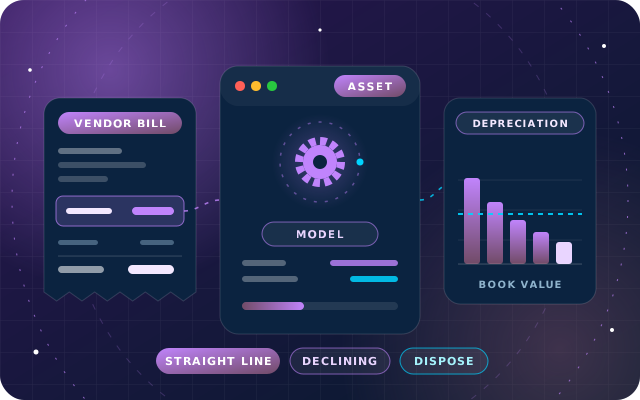
Odoo 19 offers three methods, described in Odoo's assets documentation. The choice should come from your accounting policy, not from whichever option the form shows first.
| Method | How Odoo calculates it | Typical fit |
|---|---|---|
| Straight Line | The depreciable value is divided equally across the planned number of depreciations | Buildings, fit-out, furniture and equipment with steady use |
| Declining | Each entry applies the declining factor to the remaining value, so entries fall over time, and the last entry takes whatever is left | Assets that lose most of their value early |
| Declining Then Straight Line | Declining, but never less than the straight-line amount, so depreciation is fast at first and constant later | Accelerated depreciation without small late entries and a large final catch-up |
The depreciable value is the original value minus the amount you expect to recover at the end of the asset's life, which Odoo calls the not depreciable value and accountants often call the salvage or residual value.
An asset that goes into use on 20 March has not been used for the whole of March. With prorata switched on for the asset, a feature Odoo's documentation calls Prorata Temporis, Odoo calculates the first depreciation on the time between the prorata date and the first depreciation date, instead of charging a full period. The board then ends with a matching shorter entry, so total depreciation over the asset's life does not change.
Under IAS 16, the IFRS (International Financial Reporting Standards) standard for property, plant and equipment, depreciation begins when an asset is available for use, so set the prorata date from that day rather than from the bill date when the two differ. Commissioning a production line can take weeks, and depreciation that starts early puts expense in the wrong months.
The strongest audit trail is a direct link from the bill to the asset. Odoo 19 offers three routes:
Before confirming, click Compute Depreciation to see the depreciation board: every entry Odoo will post, with its date and amount. The entries are created in draft and posted when their dates arrive, with Odoo checking once a day. If you are moving an existing register into Odoo, use the asset import templates that Odoo 19 added rather than rebuilding each asset by hand.
Tip: Write the asset policy, and walk your auditors through it, before go-live: asset classes, methods, useful lives, residual values, the capitalization threshold and whether depreciation runs monthly or yearly. Configuring Odoo is quick once those decisions are written down, and expensive to unwind afterwards.
A manufacturer buys a packaging machine for AED 120,000 before VAT and puts it into use on 1 January 2026. Its policy for machinery is straight line over five years with monthly depreciation, and it expects to sell the machine for AED 12,000 at the end of that time.
For comparison, here is the same depreciable value on yearly periods, under Straight Line and under Declining with a factor of 0.4:
| Year | Straight Line (AED) | Declining, factor 0.4 (AED) |
|---|---|---|
| 2026 | 21,600 | 43,200 |
| 2027 | 21,600 | 25,920 |
| 2028 | 21,600 | 15,552 |
| 2029 | 21,600 | 9,331.20 |
| 2030 | 21,600 | 13,996.80 |
| Total | 108,000 | 108,000 |
Notice the last declining entry: because it takes whatever balance remains, it is larger than the year before. Declining Then Straight Line avoids that pattern by never dropping below the straight-line amount.
Now suppose the company sells the machine on 31 December 2027 for AED 70,000 before VAT. Its book value on that date is AED 76,800, so the sale produces a loss of AED 6,800, which Odoo calculates and posts when the sale is recorded.
When an asset is sold, post the customer invoice first, then open the asset, click Sell or Dispose and link the invoice. For scrapping or loss, choose disposal without an invoice. Odoo generates the entries that remove the asset and its accumulated depreciation from the balance sheet, including the gain or loss: the difference between the book value at that date and the amount it was sold for.
Not every change is a disposal. When an asset is impaired or improved, use the asset's modify option instead. A decrease in value posts a value decrease entry and recalculates the future unposted entries on the board; an increase creates a separate gross increase asset, linked to the original by a smart button.
The Depreciation Schedule report in Odoo Enterprise gives you the register view of your assets for any period. Reconcile its totals with the fixed asset and accumulated depreciation accounts in the general ledger, and investigate any difference before the auditor does.
Make that reconciliation part of every close, not just the year end: confirm new assets, check that no due depreciation is still in draft and agree the register to the ledger. Our month-end close checklist for Odoo 19 shows where it fits. Keep the policy visible too, by naming each model after the rule it applies, such as "Machinery, straight line, 60 months", so a reviewer can see the rule without opening the form.
Odoo Community does not include the Enterprise assets feature. Our free SBS Account Community module adds asset depreciation for Odoo 19 Community: asset categories drive linear or degressive depreciation, the board is computed once, and the periodic entries are generated into the accounts you configure rather than keyed in. For example, an asset of 18,000 with a salvage value of 1,500 over five yearly periods gives 3,300 a year.
The same module adds the general ledger, trial balance and fiscal-year lock dates that make the asset figures auditable. It is built for Odoo 19 and tested on Odoo 19 Community, is not compatible with Odoo Enterprise accounting because it replaces Enterprise modules such as account_asset, and is listed for Odoo.sh and on-premise installations, not Odoo Online. Our earlier guide to the accounting reports Odoo Community leaves out covers the rest.
Through OdooStar, our Odoo practice, we implement and customize Odoo Enterprise, and Odoo Community where it fits, for businesses in the UAE and the GCC. On Odoo 19 Enterprise Accounting, that includes asset policies, models, account automation and the import of existing registers, with opening balances agreed to the ledger. On Odoo 19 Community, we install and configure SBS Account Community.
We also train finance teams and support the system after go-live. Send us your current asset register through the contact page and we will show you how it maps to Odoo.

Star Bit Solutions is a software company in Ajman, UAE, founded in 2014. We implement and customize Odoo Enterprise and Odoo Community, and build StarBiz (AI-driven ERP), StarHub (life super app), StarBot (conversational AI), StarLearn (adaptive learning) and StarSense (AI and IoT platform). About us
Enterprise Accounting, including assets, deferrals and lock dates, configured around your policies.
Learn MoreFree asset depreciation, ledgers, budgets and lock dates for Odoo 19 Community.
Learn MoreBills of materials, actual cost per order and machine monitoring, on StarBiz or on Odoo through OdooStar.
Learn MoreA five-day close in Odoo 19 Enterprise Accounting, with an owner for every step, plus the free Community route through SBS Account Community.
· 10 min read
Bank feeds, statement imports, reconciliation models, partial payments and write-offs in Odoo 19, with a daily routine and a month-end check.
· 10 min read
Why discounted and pack-unit returns over-refund, how the SBS bridge modules credit the price paid, and how to test it all before go-live.
· 8 min read
Not out of the box. The assets feature belongs to Odoo Enterprise Accounting. On Odoo 19 Community, the free SBS Account Community module adds asset categories with linear or degressive depreciation boards and generated depreciation entries, along with the ledgers and lock dates auditors expect. It is listed for Odoo.sh and on-premise installations, not Odoo Online.
Odoo 19 Enterprise supports Straight Line, Declining, and Declining Then Straight Line. Straight line spreads the depreciable value evenly. Declining applies a factor to the remaining value, so entries fall over time. The combined method starts as declining but never drops below the straight-line amount. Choose per asset class, in line with your accounting policy.
It means the first depreciation entry covers only the time the asset was actually available in that period, measured from the prorata date to the first depreciation date. Without it, an asset that goes into use late in a month or year is charged a full period. The board then ends with a matching shorter entry, so total depreciation is unchanged.
Post the customer invoice for the sale first. Then open the asset, click Sell or Dispose and link that invoice. Odoo removes the asset's cost and accumulated depreciation from the balance sheet and books the gain or loss, which is the difference between the book value on that date and the sale amount. Use disposal without an invoice for scrapped assets.
Yes. Set the asset account's automation to create assets in draft, or to create and validate them using an asset model. Every bill line posted to that account then produces an asset linked to the bill, which gives auditors a direct trail from purchase to register. Draft is safer while you test, and create and validate suits uniform, high-volume purchases.
We set up asset policies, models and register imports on Odoo 19 Enterprise, or SBS Account Community on Odoo 19 Community, and agree the register to your ledger.