ERP Implementation Phases: What Really Happens from Discovery to Go-Live
Star Bit Solutions8 min read
ERP implementation phases look tidy on a project plan. This guide explains what really happens in each one, from discovery and fit-gap design to testing, go-live and hypercare, who does the work on both sides and where projects slip.
Each ERP implementation phase should end with something you can see and sign off, from a scoped proposal to a reconciled trial load.
Fit-gap design decides the cost: configure first, change the process where it helps and build only where the value is clear.
Testing must prove the business can run: quote to cash, procure to pay, month-end, VAT and payroll, by the people who do the work.
Key users carry the project, so agree their time in writing before it starts and train them first.
Plan go-live with a rollback plan and hypercare, and put UAE e-invoicing in scope if your dates overlap.
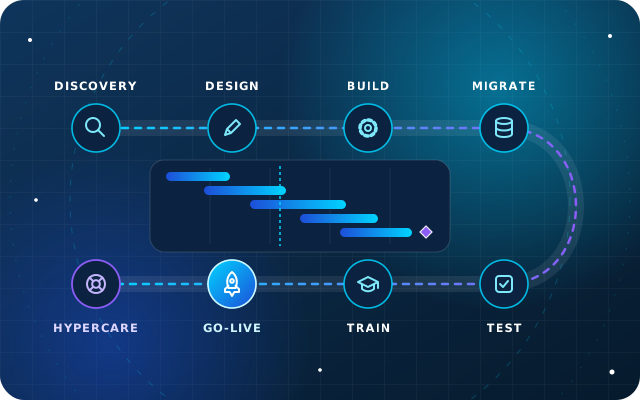
Every enterprise resource planning (ERP) proposal includes a neat diagram of phases. What it rarely shows is who does the work in each phase, what you should be able to see and sign at the end of it, and where the time really goes. Those details decide whether a project lands on its date or drifts for months.
This guide walks through the ERP implementation phases we run on StarBiz and Odoo projects, from discovery to hypercare, and maps them to the five steps on our industries page: Discover, Select, Configure, Integrate, and Train and grow. Vendors name the phases differently, but the work underneath is the same.
The ERP Implementation Phases at a Glance
Phase
What happens
What you sign off
Our five steps
Discovery
Workshops per department, real documents, reports and constraints
Scoped proposal and plan
Discover
Fit-gap design
Requirements matched to standard features, product mix chosen
Solution design
Select
Configuration
Build in short iterations, with a demo after each
Accepted demos per area
Configure
Integrations and migration
Systems connected, data cleaned, mapped and trial-loaded
Reconciled trial loads
Integrate
Testing
End-to-end scenarios and user acceptance testing
Test sign-off
Configure and Integrate
Training
Key users first, then every role on its own process
Trained users per role
Train and grow
Go-live and hypercare
Cut-over, then close support while teams settle
Go-live decision, hypercare exit
Train and grow
Phase 1: Discovery
Discovery turns a wish list into a scope. Consultants run workshops with each department and walk through real documents: a quotation, a delivery note, a supplier bill, a payslip, the reports management reads every month. They also collect volumes, integrations, compliance needs such as value added tax (VAT), corporate tax and payroll through the Wage Protection System (WPS), and constraints such as peak seasons and the financial year-end.
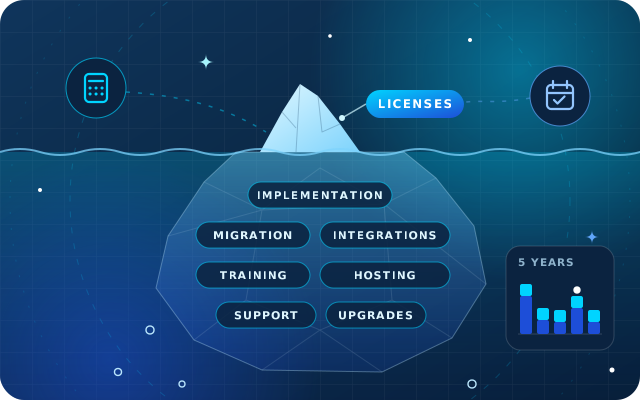
The output is a scoped proposal with a timeline, pricing, assumptions and exclusions. Discovery is also where the budget becomes real, so check the proposal against our guide to ERP total cost of ownership, which lists the costs beyond licenses that are easy to miss.
UAE e-invoicing: businesses with revenue of AED 50 million or more must appoint an accredited service provider by 30 October 2026 and go live by 1 January 2027, after the Ministry of Finance's May 2026 amendment. Businesses below that threshold must appoint one by 31 March 2027 and go live by 1 July 2027. If your project overlaps those dates, put e-invoicing in scope at discovery, using our readiness checklist. This is not tax or legal advice, so check the latest official guidance.
Phase 2: Fit-Gap Design
A fit-gap analysis compares each requirement with what the chosen system does as standard. Every line ends with one of four answers:
Fit: a standard feature, simply configured.
Configure: settings, workflows, approval rules or report layouts.
Change the process: adopt the system's way where your current process has no real advantage.
Build: a customization or integration, justified by its value and its cost at every future upgrade.
This is also the Select step: StarBiz or Odoo for operations, which modules or apps, which edition and hosting, and whether StarSense devices or StarBot conversations join the project. The output is a solution design covering processes, the chart of accounts, approval limits, the integration list, the migration plan and the test strategy. Projects get expensive here when every gap becomes a customization.
A Worked Example: Five Requirements, Four Answers
Take five requirements from a typical UAE distributor's workshop:
Sell in cartons and in pieces: a fit, using standard units of measure and packaging.
Approve discounts above a set limit: configure an approval rule.
Show the customer's purchase order number on the delivery note: configure the report layout.
Re-key every order into the warehouse's own spreadsheet: change the process, so the warehouse works from delivery orders in the system.
Pull orders from a key customer's procurement portal: build an integration, if the order volume justifies its cost.
Only one of the five needs development, and that is the pattern a good fit-gap design aims for: every build item adds testing now and porting work at every upgrade.
Have a question about this guide? Ask the engineers who wrote it.
Configuration works best in short iterations, one area at a time, each ending with a demo to the people who will use it. Products, partners, units, warehouses, the chart of accounts, approval rules and sector-specific fields are prototyped on your sample data first, so feedback arrives while changes are cheap.
Two habits keep this phase on track. Configure first, use no-code tools such as Odoo Studio on Enterprise second and write custom modules last, so upgrades stay predictable. And once the design is signed off, route every new request through change control, with its effect on time and cost written down before anyone says yes.
Phase 4: Integrations and Data Migration
Integrations connect the ERP to banks, payment gateways, e-commerce, point of sale, meters, machines and legacy systems, through adapters, a REST API or scheduled file exchange. Each one needs an owner on both sides, a test environment and a plan for errors, not just the happy path.
Data migration runs in parallel. Master data clean-up should start in discovery, with a named owner for customers, products and the chart of accounts. Then come at least two trial loads, each reconciled to the old system, before the final load at cut-over. Opening balances are the step most projects underestimate, and our guide to opening balances and cut-over covers balances, open items, the stock count and validation.
Phase 5: Testing That Proves the Business Can Run
Consultants test each function as they build it. The testing that matters most comes later: end-to-end scenarios and user acceptance testing (UAT), where key users run real cases and sign that the system supports their work. Use real documents from last month, at realistic volumes, and test these scenarios at least:
Quote to cash: quotation, order, delivery, invoice, payment and bank reconciliation.
Procure to pay: request, purchase order, receipt, bill and payment.
Stock: transfers, counts, returns and valuation.
Month-end: accruals, depreciation, reconciliations and management reports.
VAT: a full return from test transactions, including credit notes and reverse charge.
Payroll: a complete run with leave and end-of-service.
Access: each role sees and does only what it should.
Integrations: failures and retries, not just successful messages.
Log every defect with a severity, fix the critical ones before go-live and agree in writing which minor ones can wait. Acceptance is signed by your key users, not by the implementer.
Phase 6: Training for Each Role
Train key users first, during configuration and testing, so they become the first line of support for their teams. Train everyone else by role, on their own process and with their own data, close enough to go-live that they remember it. Leave each team with written procedures and short videos, and give administrators separate training on users, access rights and configuration.
Phase 7: Go-Live and Hypercare
Go-live starts with a go or no-go meeting against agreed criteria: tests signed off, users trained, opening balances validated, integrations working and support cover booked. The cut-over follows a runbook, with a rollback plan written before anyone needs it.
Hypercare is the period of close support straight after go-live. Expect daily check-ins, a prioritized issue log, support through the first month-end close and agreed exit criteria, such as month-end closed in the system and no team relying on workarounds. After that comes continuous improvement: reports, automation and the next phase of scope.
Who Does What: Roles on Both Sides
Area
Your side
Implementer's side
Direction
Executive sponsor: owns the business case, scope and priorities
Engagement lead: owns delivery and escalations
Planning
Project manager: secures people's time and chases decisions
Project manager: plan, risks and status reports
Processes
Key users per department: explain, test and train colleagues
Functional consultants: design and configure
Data
Data owners and a finance lead: clean, approve and sign off
Migration specialist: extract, map, load and reconcile
Technology
IT contact: access, infrastructure and your side of integrations
Developers: integrations and customizations
A frequent mistake is giving key users the project on top of a full day job. Agree their time in writing before the project starts, and backfill routine work where you can.
Common Risks and How to Defuse Them
Scope creep: apply change control from the design sign-off onwards.
Dirty data: start the clean-up in discovery, with named owners.
Too much customization: configure first, and give every build item a business case.
Squeezed testing: protect the testing window, and do not go live without user acceptance sign-off.
Generic training: train by role, close to go-live, with each team's own data.
The wrong go-live date: avoid year-end and peak season, and start at the beginning of a VAT period.
No owner after go-live: name a system owner and agree the support arrangement before hypercare ends.
How Star Bit Solutions Can Help
We run these phases on StarBiz, our AI-driven ERP, and on Odoo Enterprise and Community through OdooStar. StarBiz projects move from a free discovery consultation and a scoped proposal to design, configuration in short iterations with weekly demos, migration and training, then a supported cut-over and hypercare. Odoo projects follow the same method, with Studio configuration, custom modules and integrations built in short iterations and a demo at the end of each.
Star Bit Solutions is a software company in Ajman, UAE, founded in 2014. We implement and customize Odoo Enterprise and Odoo Community, and build StarBiz (AI-driven ERP), StarHub (life super app), StarBot (conversational AI), StarLearn (adaptive learning) and StarSense (AI and IoT platform). About us
Requirements, vendor questions, a demo script with a worked landed cost example, and how Odoo Enterprise, Odoo Community and StarBiz compare for UAE traders.
What are the main phases of an ERP implementation?
Most ERP implementations run through discovery, fit-gap design, configuration, integrations and data migration, testing, training, and go-live with hypercare. Vendors name and group them differently, but each phase should end with something you can see and sign off, such as a scoped proposal, a solution design, accepted demos or a reconciled trial load.
How long does an ERP implementation take?
It depends on scope, the number of companies and sites, data quality, integrations and how much customization is needed. A focused finance, sales and inventory rollout is far smaller than multi-site manufacturing with payroll. Treat any estimate given before discovery as a range, and expect a scoped plan with a realistic timeline after it.
What is a fit-gap analysis in ERP?
A fit-gap analysis compares each business requirement with what the chosen ERP does as standard. Each requirement is marked as a fit, a configuration, a process change or a gap that needs development or an integration. It turns a wish list into a costed scope, and it is the best moment to avoid customizations you do not need.
What is hypercare after an ERP go-live?
Hypercare is the period of close support straight after go-live, when the implementation team stays on hand while users settle in. It usually covers daily check-ins, a prioritized issue log, support through the first month-end close and agreed exit criteria, after which the system moves to normal support and continuous improvement.
Who should be on the ERP project team?
On your side: an executive sponsor, a project manager, key users from each department, data owners, a finance lead and an IT contact. On the implementer's side: a project manager, functional consultants, developers for integrations and customizations, and a data migration specialist. Agree each person's time before the project starts.
StarBiz by Star Bit Solutions
Know What Happens in Every Phase before You Sign.
Book a free consultation. We will map your processes, recommend StarBiz or Odoo and give you a phased plan with a realistic timeline.