ERP Total Cost of Ownership: What to Budget for beyond Licenses
Star Bit Solutions9 min read
ERP total cost of ownership is everything you will spend to choose, implement, run and change a system over its life. Here is what to budget for beyond licenses, where the hidden costs sit and how to compare quotes fairly.
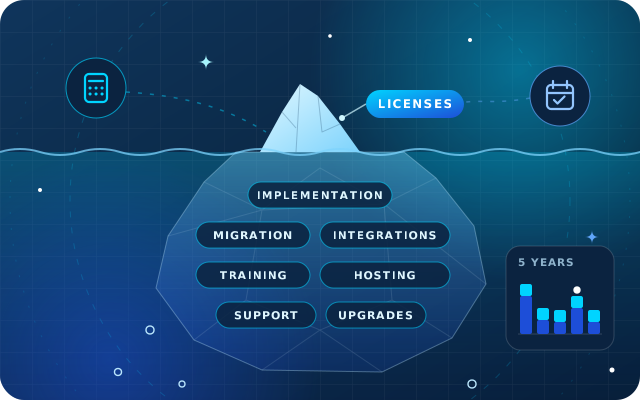
ERP total cost of ownership covers every cost to choose, implement, run and change a system, so budget over several years, not just the first.
Implementation, data migration, integrations, training and your own team's time can matter as much as subscriptions or licenses.
Customization looks cheap at go-live and costs again at every upgrade, so configure first and customize only where it pays.
Compare quotes like for like: the same scope, users and horizon, with every exclusion and assumption written down.
Phasing spreads cost and risk, provided each phase delivers complete processes rather than fragments of departments.
Ask for an ERP quote and the first number you notice is usually the subscription or license fee. It is the easiest figure to compare, and it is rarely the one that decides whether the project stays on budget. The rest sits in implementation, data, integrations, people's time and the years of running and upgrading the system that follow go-live.
ERP total cost of ownership (TCO) puts all of those costs in one view. This guide sets out the cost categories to budget for, the hidden costs that most quotes leave out, how to compare quotes like for like and how to phase a project without phasing in risk. It deliberately contains no prices: your scope decides those, and any article quoting a typical figure is guessing.
What ERP Total Cost of Ownership Means
ERP total cost of ownership is everything you will spend to choose, implement, run and change a system over the period you expect to use it. It includes cash paid to vendors and partners, and the time of your own staff, which never appears on an invoice but is just as real.
Two choices shape the calculation. The first is the horizon: a five-year view is a sensible default, because it covers implementation, several years of running costs and at least one major upgrade. The second is the split between one-off costs, such as implementation and data migration, and recurring ones, such as subscriptions, hosting and support. Keep them on separate lines, or a quote with low set-up costs and high running costs will always look cheaper than it is.
The Ten Cost Categories to Budget for
Every ERP budget should account for these categories, whichever system and partner you choose.
Category
One-off or recurring
What drives the cost
Subscriptions or licenses
Recurring, or one-off plus annual maintenance
Number of users, apps or modules, and the plan or edition
Implementation
Mostly one-off
Processes in scope, companies, sites and the depth of configuration
Data migration
One-off
Volume of history, data quality and the number of source systems
Customization
One-off, then again at each upgrade
Gaps between standard features and the way you work
Integrations
One-off build, recurring upkeep
Banks, payment gateways, e-commerce, point of sale and devices
Training and change management
Mostly one-off, recurring for new staff
Number of users and roles, and the training format
Hosting and infrastructure
Recurring
SaaS, a managed cloud platform or your own servers
Support and maintenance
Recurring
Service levels, response times and change requests
Upgrades
Periodic
The vendor's version policy and the amount of custom code
Internal team time
Throughout
Workshops, testing, data clean-up and running two systems
Subscriptions or Licenses
Many modern ERPs are sold as subscriptions, usually priced per user and sometimes per app or module. Check what counts as a user. Odoo, for example, charges for people who log in to the back end to create, view or edit records, usually employees, while customers and suppliers using the portal are not paying users. Check what the plan leaves out, too: Odoo's pricing page lists hosting on Odoo.sh for custom developments, implementation services, in-app purchase credits and maintenance of custom code as not included.
Implementation and Data Migration
Implementation covers discovery, process design, configuration, testing, training and go-live support. Data migration is often quoted separately, and the biggest decision is how much history to bring across: opening balances and open items only, or several years of transactions. More history means more mapping, more cleansing and more reconciliation, so decide it deliberately. Our guide to opening balances and cut-over explains the options.
Customization and Integrations
Every custom field, report or module has a build cost and a maintenance cost. On Odoo Enterprise, Odoo's upgrade service covers the standard apps and changes made with Studio, but modules written in-house or by third parties are not covered unless a maintenance contract includes them, so whoever maintains them must port them to each new version. That is why configuration and no-code tools should come first, as we explain in when to configure, customize or write code. Integrations follow the same rule: each one needs monitoring and retesting whenever either side changes.
Hosting, Support and Upgrades
SaaS (software as a service) usually includes hosting in the subscription. A managed cloud platform may be billed separately, and your own servers add hardware or cloud fees, backups, monitoring, security patches and administrator time. Our comparison of Odoo Online, Odoo.sh and on-premise hosting walks through those trade-offs. Upgrades deserve their own line: according to Odoo's upgrade documentation, each major version is supported for three years, so a five-year plan should include at least one major upgrade. The same page notes that cleaning up old data and training people on the new version are not part of the upgrade service, so budget for both.
The Hidden Costs Most Budgets Miss
These costs rarely appear in a vendor's quote, because they are partly or wholly yours. They are also a common source of overruns.
Backfilling key users. The people who know your processes best spend days in workshops, testing and training, and someone has to cover their normal work.
Data cleansing. Merging duplicate customers, fixing product codes and units of measure, and closing old open items before they are migrated.
Cut-over and parallel running. A freeze period, a stock count at cut-over and, if you choose it, a period of entering transactions in both systems.
Rebuilding reports and documents. Management packs, customer statements, invoice layouts and the spreadsheets people relied on in the old system.
Hypercare. Extra support in the weeks after go-live, when questions peak and small fixes are urgent.
Usage-based charges. SMS, e-signatures, payment gateway fees and document scanning. In Odoo, services such as SMS and the digitization of vendor bills use prepaid in-app purchase (IAP) credits.
Regulatory change. VAT rules, Corporate Tax and the e-invoicing system announced by the Ministry of Finance all reach the ERP. Ask who delivers legal updates and who pays for them.
Add-ons from third parties. Each one brings its own fee, its own maintenance and a dependency at every upgrade.
Contingency. Scope you discover during the project. Set a contingency budget and a rule for releasing it, rather than hoping it will not be needed.
Have a question about this guide? Ask the engineers who wrote it.
Two quotes are only comparable if they price the same scope over the same period. A simple discipline makes that possible:
Fix the scope before asking for prices. Send every vendor the same process map, the same list of companies, sites and users by role, and the same integrations, reports and data to migrate.
Fix the horizon. Ask for costs over the same number of years, with one-off and recurring costs on separate lines.
Use one template. Ask every vendor to fill in the ten categories above, and to mark each line as included, excluded or capped.
Write down the assumptions. Years of history to migrate, number of training sessions, support hours and response times, who maintains custom code and who pays for upgrades.
Price change requests. Ask how work outside the agreed scope is estimated and approved, because some of it will happen.
Add your own costs. Internal time, infrastructure you provide and any temporary staff. No vendor can quote these for you.
Weigh cost against value. Put the total next to what your current workarounds cost. If you are still deciding whether you need an ERP at all, start with our seven signs you need an ERP.
Worked Example: Two Quotes That Are Not What They Seem
Picture two hypothetical quotes for the same distributor. Quote A has the lower headline figure. Quote B looks more expensive. Laid out on one template, they read differently:
Cost line
Quote A
Quote B
Data migration
Opening balances only
Opening balances, open items and two years of sales history
Bank and e-commerce integrations
Priced later as change requests
Included and tested
Training
Two general sessions
Role-based sessions and written procedures
Hypercare after go-live
Not mentioned
Included for an agreed period
Support
Email, no response times
Defined response times and a monthly allowance
Upgrades and custom code
Not mentioned
Custom modules ported as part of the support plan
Once the excluded items in Quote A are priced and added, the gap narrows or reverses, and Quote B also carries less risk of surprises. The cheaper quote was not dishonest; it simply described a smaller project.
Phasing: Spreading the Cost without Spreading the Risk
Phasing splits the project into stages that each go live on their own. A common first phase covers finance with sales, purchasing and inventory, and later phases add manufacturing, HR and payroll, projects, forecasting or connected devices. The first budget is smaller, value arrives sooner and each phase benefits from the lessons of the last.
The risk lies in splitting a single process across two systems, because temporary interfaces and double entry cost money of their own. Phase by complete processes, not by fragments of departments.
Tip: budget each phase as if it were the last. If phase one cannot pay its way without the later phases, it is the wrong first phase.
Five Ways to Keep ERP Total Cost of Ownership down
Configure before you customize. Standard features and settings first, no-code tools second and custom code last, so upgrades stay predictable.
Keep custom code separate. Put it in documented modules rather than changes to the vendor's own code, so it can be tested and ported cleanly.
Buy for go-live, not for someday. Start with the users and apps you need now, and add the rest when people will actually use them.
Clean data once, then keep it clean. Name an owner for customers, products and the chart of accounts, so the clean-up is not repeated.
Invest in key users. Well-trained key users become your first line of support and reduce the support hours you buy.
How Star Bit Solutions Can Help
We give you an honest scope, timeline and pricing before any commitment, laid out so you can compare it with other quotes on the same terms.
StarBiz, our AI-driven ERP, is modular: costs scale with the modules you switch on and the number of people who use them, and it runs in the cloud, on your own servers or as a hybrid. If Odoo suits you better, OdooStar, our Odoo practice, starts an Odoo Enterprise implementation by settling which apps you need now, how many users need an account and which hosting fits, before you subscribe. Where Odoo Community covers what you need, we implement that too, and our comparison of Odoo Enterprise vs Community sets out the cost differences.
Star Bit Solutions is a software company in Ajman, UAE, founded in 2014. We implement and customize Odoo Enterprise and Odoo Community, and build StarBiz (AI-driven ERP), StarHub (life super app), StarBot (conversational AI), StarLearn (adaptive learning) and StarSense (AI and IoT platform). About us
Requirements, vendor questions, a demo script with a worked landed cost example, and how Odoo Enterprise, Odoo Community and StarBiz compare for UAE traders.
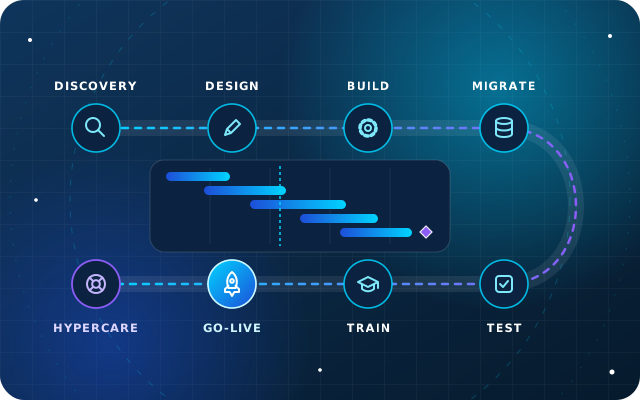
Discovery, fit-gap design, configuration, migration, testing, training, go-live and hypercare explained, with the roles on both sides and the risks to watch.
Everything you spend to choose, implement, run and change the system over the period you plan to use it: subscriptions or licenses, implementation, data migration, customization, integrations, training, hosting, support, upgrades and the time your own staff spend on the project. Keep one-off and recurring costs on separate lines, and use the same horizon, such as five years, for every option you compare.
Is a subscription ERP cheaper than a perpetual license?
Not automatically. A subscription spreads the cost and usually includes upgrades, and sometimes hosting and support. A perpetual license costs more up front and is normally followed by annual maintenance fees for updates and support, with hosting paid separately. The only fair comparison puts both options over the same horizon, with the same scope, users and support level.
How much should we budget for implementation compared with licenses?
There is no reliable fixed ratio, because implementation cost depends on your processes, data quality, integrations and how much customization you need. Build the budget from your own scope instead: map the processes, list the data and integrations, and ask each vendor to price every category separately. Then add your internal time and a contingency with a clear rule for using it.
Does Odoo Enterprise include upgrades?
Yes. Odoo's plans include upgrades at no extra fee, and its upgrade service covers the standard apps and changes made with Studio. Modules written in-house or by third parties are not covered unless a maintenance contract includes them, so they must be ported to each new version. Odoo.sh hosting, implementation services and in-app purchase credits are also outside the subscription.
StarBiz by Star Bit Solutions
Budget for the Whole ERP, Not Just the License.
Send us a process map or a rough scope. We will reply with an honest scope, timeline and pricing, laid out so you can compare it with any other quote.