Seven Signs You Need an ERP: When Spreadsheets and Basic Accounting Stop Keeping up
Star Bit Solutions10 min read
Spreadsheets and basic accounting software carry most businesses a long way. These are the signs you need an ERP, what each one quietly costs and how to move from symptoms to a scoped, comparable shortlist.
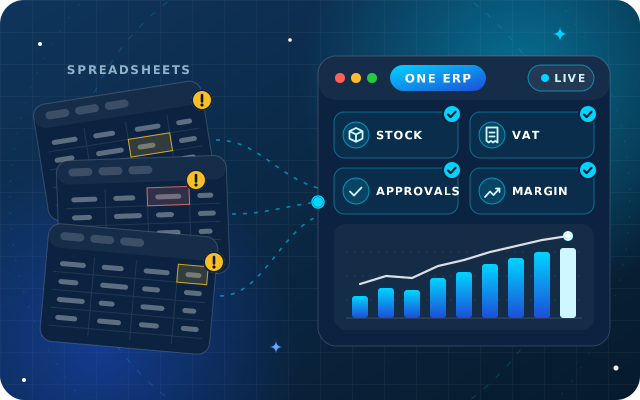
Several versions of the truth, a slow month-end and stock that never matches the shelf are among the clearest signs you need an ERP.
Each symptom has a cost: hours spent reconciling, decisions made late, cash tied up in the wrong stock and risk at VAT or audit time.
Approvals over chat and no live margin per order are control problems, not just admin, and they grow with every new branch.
Before you compare vendors, map your processes, put a cost on each pain point and agree a phase-one scope.
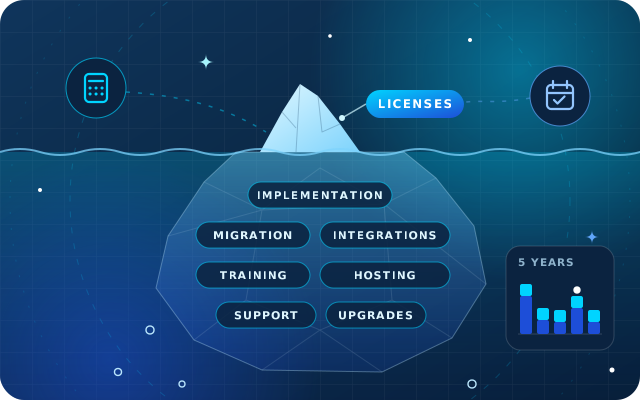
Compare options like for like, on your own data, with the cost over several years in view, not just the first-year price.
Few businesses decide to buy an ERP on a particular Tuesday. They drift towards it. A spreadsheet for stock, another for the price list, a basic accounting package for invoices and a WhatsApp group for approvals work well at the start. Then the business adds people, products and a second location, and the links between those tools start to cost more than the tools themselves.
This guide sets out seven signs you need an ERP, what each one costs in practice and what to do next, so the decision rests on evidence rather than frustration. It is written for owners and finance managers of growing businesses in the UAE, but the symptoms look much the same anywhere.
Why Spreadsheets and Basic Accounting Stop Keeping up
Spreadsheets are flexible, cheap and familiar, and basic accounting software does its core job well: invoices, bills, payments and a set of accounts. The trouble starts in the gaps between them. Every time someone exports, re-keys or reconciles data from one tool to another, the business pays in time and accuracy.
An ERP (enterprise resource planning system) closes those gaps by keeping sales, purchasing, stock, finance and often HR and projects in one database. A sales order reserves stock, the delivery updates the stock value, the invoice posts to the ledger and the payment clears the receivable, without anyone copying a number. That shared record matters more than any single feature.
Seven Signs You Need an ERP
It is common to recognize two or three of these at once. Each one is manageable on its own. Together, they usually mean the tools, not the people, have become the constraint.
1. Several Versions of the Truth
The sales report says one thing, the finance figures another and the warehouse sheet a third. Management meetings open with an argument about whose numbers are right, and every report carries a note about when it was last updated.
What it costs: hours spent reconciling instead of deciding, and decisions taken on figures that were already out of date. In an ERP, a report is a view of live transactions, so the discussion moves on from whose numbers are right to what to do about them.
2. Month-End Takes Longer Every Quarter
Closing the books depends on exports, copy and paste, and one person's spreadsheet of adjustments. Bank lines are matched by hand, stock valuation is estimated and the management accounts arrive weeks after the month they describe.
What it costs: finance time at the busiest point of the month, a key-person risk whenever the spreadsheet owner is away, and results that arrive too late to change anything. When entries post automatically as goods move and invoices are confirmed, month-end becomes a review rather than a rebuild.
3. Stock That Never Matches the Shelf
The system says twelve cartons, the shelf holds nine and nobody can say where the other three went. Sales staff phone the warehouse before promising a delivery date, buyers reorder on instinct and expired or slow-moving stock turns up at the annual count.
What it costs: lost sales from stock-outs, cash tied up in the wrong items, write-offs and customers who stop trusting your delivery dates. An ERP ties every receipt, transfer, delivery and adjustment to a document and a user, per warehouse and location, with lot and expiry tracking where you need it.
4. Approvals Happen over Chat
A discount is approved with a thumbs-up on WhatsApp, a purchase is agreed in a corridor and an expense is signed off by email. It works while everyone remembers, and it falls apart when an auditor, a new manager or a dispute asks who approved what, and why.
What it costs: margin given away without a rule, purchases outside budget and no audit trail when you need one. In an ERP, approval rules sit on the document itself. A quotation above a set discount, or a purchase order above a set value, waits for the right person, and the system records the decision.
5. No Live Margin per Order
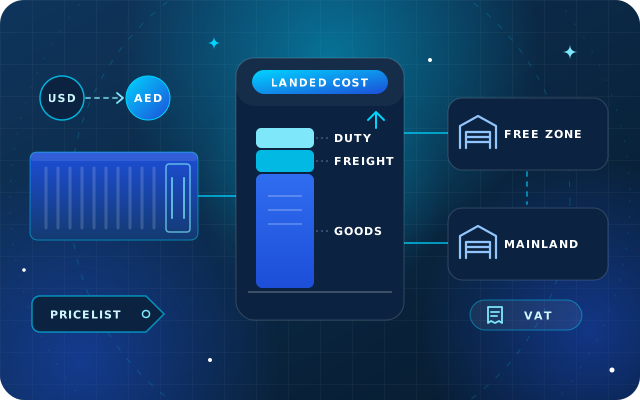
Revenue is easy to see. Margin is not, because the true cost of an order is spread across supplier invoices, freight and customs charges, discounts, returns and the stock valuation method. In spreadsheets, that calculation happens once a year, if at all.
What it costs: customers and product lines that look profitable and are not, price lists that lag behind cost increases and sales teams rewarded for volume rather than profit. An ERP that records landed costs and links each return to the original sale can show margin per order, customer and product while it still matters.
6. VAT Returns and Audits Mean a Scramble
Every quarter, someone rebuilds the VAT position from exports, chases missing invoices and corrects tax codes by hand. The Federal Tax Authority expects the return and payment within 28 days of the end of each tax period, so the scramble always runs against the clock. Auditors then ask for the documents behind the numbers, and finding them takes days.
What it costs: staff time, late corrections and the risk of penalties. With Corporate Tax in force, the books must also support a tax computation, and the records behind it must be kept for seven years after the end of the tax period. Our corporate tax accounting checklist covers what that asks of your system. An ERP applies tax codes when the sale or purchase is entered, keeps the invoice attached to the entry and builds the VAT report from posted transactions.
7. A New Branch, Warehouse or Company Breaks the System
A second warehouse means stock transfers. A free zone entity alongside a mainland company means two sets of books and inter-company invoices. A new currency means exchange differences. Each step adds another spreadsheet, another login and another monthly reconciliation.
What it costs: overhead that grows faster than revenue, consolidation done by hand and controls that differ from one site to the next. An ERP runs multiple companies, warehouses and currencies in one database, with access rules per company or branch.
What Each Sign Costs, at a Glance
Use this table to turn frustration into a business case. The middle column is where the money goes; the right-hand column is what an ERP changes.
Sign
Where the cost shows up
What changes with an ERP
Several versions of the truth
Time spent reconciling, decisions made late
Every report reads the same live transactions
Slow month-end
Finance overtime, late management accounts
Automatic postings and bank matching
Stock that never matches
Stock-outs, write-offs, cash in excess stock
Every movement tied to a document and a user
Approvals over chat
Unchecked discounts and purchases
Approval rules and an audit trail on each document
No live margin per order
Unprofitable customers and products kept on
Landed costs and returns linked to each sale
VAT and audit scramble
Rework, late corrections, penalty risk
Tax codes at entry and documents attached
New branches or companies
Overhead that grows with every site
Multi-company, multi-warehouse and multi-currency in one system
Put your own figures against each row: hours per month, write-offs per year, days to close the books. Those numbers carry far more weight in a board discussion than any vendor's brochure.
Have a question about this guide? Ask the engineers who wrote it.
Read these statements with your finance and operations leads. Each one you agree with is a reason to look seriously at an ERP.
We spend part of every management meeting reconciling figures from different reports.
Month-end depends on one or two people and their spreadsheets.
We cannot see stock per warehouse, or by lot and expiry date, without a phone call.
Discounts, purchases or expenses are approved in chat or by email.
We learn the margin on a customer or product weeks after the sale.
Each VAT return involves exports, manual corrections or missing invoices.
Adding a branch, warehouse or company would mean another set of spreadsheets.
If three or more apply, staying put probably costs more than it appears to. If only one applies, a targeted fix, such as a better stock-count routine or a simple approval tool, may be enough for now.
What to Do Next: Map, Scope and Compare
Recognizing the signs is the easy part. The next steps decide whether an ERP project lands well or becomes an expensive copy of the old spreadsheets.
Map how work really flows. Walk through each main process end to end: quote to cash, purchase to pay, receipt to delivery and the month-end close. Note who does each step, which document or spreadsheet they use and where data is typed twice.
Put a cost on the pain. Use the table above with your own figures, then rank problems by cost and risk rather than by who complains loudest.
Agree a phase-one scope. Decide what must work on go-live day, usually finance, sales, purchasing and inventory, and what can follow, such as manufacturing, HR or projects. A smaller first phase goes live sooner and teaches you more.
Start cleaning master data now. Duplicate customers, inconsistent product codes and mixed units of measure will follow you into any new system. Fixing them early improves reporting even before go-live.
Compare options like for like. Give every vendor the same process map and scope, and compare apps, hosting, implementation, support and upgrades over several years, not just the first-year price. If Odoo is on your list, our guide to Odoo Enterprise vs Community explains the editions.
Insist on a demo with your data. Ask to see your own products, a real customer order and a typical approval running end to end. A demo built on sample data proves very little.
Tip: keep the spreadsheets that genuinely help. Analysts will still export to Excel for modeling and one-off questions. The goal is to stop using spreadsheets as the system of record, not to ban them.
Worked Example: A Distributor with Two Warehouses
Picture a hypothetical distributor of food and household products with a main warehouse, a smaller branch store and a sales team on the road. It recognizes signs three, four and five: stock counts that never agree, discounts agreed by phone and margins known only at year-end.
Mapping shows the root cause. Transfers between the two sites live in a spreadsheet, so each location's stock is wrong until someone reconciles it. Phase one therefore covers accounting, sales, purchasing, two-warehouse inventory with scanned transfers and discount approval rules. Private-label packing and HR wait for phase two.
When the distributor compares options, every vendor receives the same process map and is asked to show three things: a transfer between warehouses, a discounted order that needs approval and the margin report for that order. Those three requests separate the shortlist faster than any feature list.
How Star Bit Solutions Can Help
We start every engagement with the mapping and scoping described above, because an ERP project succeeds or fails on process and data long before software is configured.
StarBiz, our AI-driven ERP, brings finance, sales, inventory, procurement, manufacturing, HR and projects into one data model, with approval workflows, live dashboards and an audit trail. It is modular, so you can start with finance, sales and inventory and add the rest later, in the cloud or on your own servers. Our article on what an AI-driven ERP actually does explains the forecasting and automation that follow once the basics are in place.
If Odoo suits you better, OdooStar, our Odoo practice, implements Odoo Enterprise around your processes, and Odoo Community where it covers what you need. You can also see how we configure each sector on our industries page.
Tell us which of the seven signs you recognize through the contact page, call +971 55 973 4524 or email [email protected]. An engineer will map the gaps with you and suggest a sensible first phase.
Written by the Star Bit Solutions team
Star Bit Solutions is a software company in Ajman, UAE, founded in 2014. We implement and customize Odoo Enterprise and Odoo Community, and build StarBiz (AI-driven ERP), StarHub (life super app), StarBot (conversational AI), StarLearn (adaptive learning) and StarSense (AI and IoT platform). About us
Requirements, vendor questions, a demo script with a worked landed cost example, and how Odoo Enterprise, Odoo Community and StarBiz compare for UAE traders.
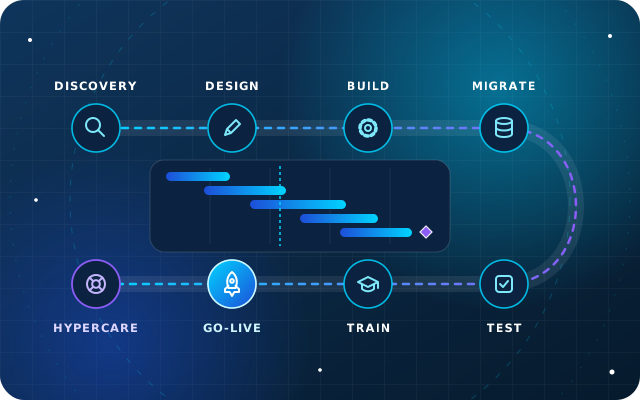
Discovery, fit-gap design, configuration, migration, testing, training, go-live and hypercare explained, with the roles on both sides and the risks to watch.
When should a small business move from spreadsheets to an ERP?
When keeping spreadsheets in step costs more than running a proper system. Typical triggers are a month-end that depends on one person, stock that rarely matches the shelf, approvals handled in chat and a new branch, warehouse or company on the way. If three or more of the seven signs apply, start mapping your processes and scoping a first phase, even if you buy later.
What is the difference between accounting software and an ERP?
Accounting software records invoices, bills, payments and the ledger. An ERP covers those too, but it also runs the operations that create the transactions, such as sales orders, purchasing, stock, manufacturing, HR and projects, in one database. The practical difference is that an ERP posts accounting entries automatically as goods move and documents are confirmed, so finance works from the same records as everyone else.
How long does an ERP implementation take?
It depends on scope, the number of sites and the state of your data. A focused rollout of finance, sales and inventory is usually measured in weeks, while multi-company or manufacturing projects take longer. Data clean-up and decisions on your side are often the biggest variables, so a clear process map and an agreed phase-one scope shorten the timeline more than anything else.
Is an ERP affordable for a small or mid-sized business?
Often, yes, if it is scoped well. Modern ERPs are modular and usually priced by the modules you use and the number of people who log in, so a growing business can start with finance, sales and inventory and add the rest later. Compare the total cost over several years, including implementation, hosting, support and upgrades, with what your current workarounds cost.
Can we keep using Excel after moving to an ERP?
Yes. Most ERPs export reports to XLSX, and analysts will still use spreadsheets for modeling and one-off questions. What changes is that the spreadsheet stops being the system of record. Orders, stock, invoices and approvals live in the ERP, and any spreadsheet becomes a copy of live data rather than the only place a number exists.
StarBiz by Star Bit Solutions
Swap the Spreadsheets for One System Everyone Trusts.
Tell us which signs you recognize. An engineer will map the gaps with you, suggest a phase-one scope and build a demo around your own products and customers.